


Your TLS handshake sends the certificate chain in the clear on every fresh connection, and on a typical site it is the largest thing in that handshake. NGINX certificate compression fixes that with one directive: ssl_certificate_compression on;. On our packages it shrank a real production chain from 4735 to 3750 bytes, a 20.8% saving on every fresh handshake.
That is RFC 8879, and NGINX has supported it since 1.29.1. So why is almost nobody running it?
Two reasons, and both are packaging problems rather than configuration problems. Your distribution’s NGINX is too old to have the directive, and your distribution’s OpenSSL was built without the compression algorithms that browsers actually ask for. The second one is the nastier of the two, because it fails silently: you turn the feature on, nginx -t passes, and Chrome still receives an uncompressed certificate.
There is also one directive that will refuse to start NGINX if you leave it in place. We will get to that, because it is in nearly every hardened configuration on the internet.
Installing NGINX certificate compression
RHEL / CentOS / AlmaLinux / Rocky Linux / Amazon Linux
sudo dnf install https://extras.getpagespeed.com/release-latest.rpm
sudo dnf install nginx
An existing installation upgrades in place:
sudo dnf upgrade nginx openssl35-libs
Debian / Ubuntu
First, set up the GetPageSpeed APT repository, then:
sudo apt-get update
sudo apt-get install nginx
Both pull in openssl35-libs, our ABI-isolated OpenSSL 3.5 LTS build, which is where the compression algorithms live. Confirm what you got:
nginx -V 2>&1 | grep "built with"
That should report built with OpenSSL 3.5.8+gps.
Why the certificate chain is worth compressing
In a TLS 1.3 handshake the server’s first flight is dominated by one message: Certificate. A two-certificate chain with RSA-2048 keys runs to a couple of kilobytes, and a chain with a cross-signed intermediate can be far larger. Everything else the server sends, the ServerHello, the key share, the Finished message, is small by comparison.
That matters more than the raw byte count suggests. The server’s first flight competes with the initial congestion window, and under QUIC it competes with the amplification limit, which caps a server at three times what the client sent before address validation. Shaving a kilobyte off the chain is the difference between fitting in that budget and taking an extra round trip, on every fresh connection, for every visitor.
RFC 8879 solves this. The client advertises which compression algorithms it supports in a compress_certificate extension, the server compresses the chain with one of them and sends CompressedCertificate instead. It is TLS 1.3 only, by design: the certificate message is encrypted there, so middleboxes cannot see or mangle it.
The fallback is completely safe. A client that offers no compress_certificate extension receives the ordinary uncompressed chain. There is no negotiation to get wrong and nothing to break. That is why NGINX certificate compression is one of the few TLS changes you can roll out without a staged rollback plan.
The part that catches everyone: algorithms are baked into OpenSSL
RFC 8879 defines three algorithms, and browsers did not converge on one:
| Browser | Offers zlib | Offers brotli | Offers zstd |
|---|---|---|---|
| Google Chrome / Edge | No | Yes | No |
| Mozilla Firefox | Yes | Yes | Yes |
| Apple Safari | Yes | No | No |
| Cloudflare’s edge (as a server) | No | Yes | No |
Chrome, the majority browser, offers brotli and nothing else. Safari offers zlib and nothing else. Only Firefox offers all three.
Here is the trap. Whether OpenSSL can do brotli or zstd is fixed when OpenSSL is compiled, by enable-brotli and enable-zstd. No distribution enables them. So a distribution OpenSSL supports zlib and only zlib, which means it can serve Safari and it cannot serve Chrome, and nothing in your configuration will tell you.
You can see this in the linked libraries. On Rocky Linux 10, whose system OpenSSL is a perfectly modern 3.5.1:
readelf -d /usr/lib64/libcrypto.so.3 | grep NEEDED
    Shared library: [libz.so.1]
Against our build:
readelf -d /usr/lib64/openssl35/libcrypto.so.35.3 | grep NEEDED
    Shared library: [libz.so.1]
    Shared library: [libbrotlienc.so.1]
    Shared library: [libbrotlidec.so.1]
    Shared library: [libzstd.so.1]
Being on OpenSSL 3.5 is not enough. The distribution build is 3.5.1 and it still cannot compress a certificate for Chrome.
Proving it, rather than asserting it
Same machine, same certificate, same OpenSSL 3.5 major version, same -cert_comp flag. The only difference is which build is serving. We restricted the client to one algorithm at a time so each row is a direct answer to “does this algorithm work here”:
| Client offers | Distro OpenSSL 3.5.1 | Our openssl35 3.5.8 |
|---|---|---|
| nothing | Certificate, 844 bytes | Certificate, 844 bytes |
| zlib only (Safari) | CompressedCertificate, 834 | CompressedCertificate, 834 |
| brotli only (Chrome) | Certificate, 844 (uncompressed) | CompressedCertificate, 828 |
| zstd only | Certificate, 844 (uncompressed) | CompressedCertificate, 817 |
| all three (Firefox) | CompressedCertificate, 834 | CompressedCertificate, 828 |
On the distribution build, a Chrome-shaped client gets an uncompressed chain from a server that believes compression is enabled. That is the whole argument for shipping our own TLS library.
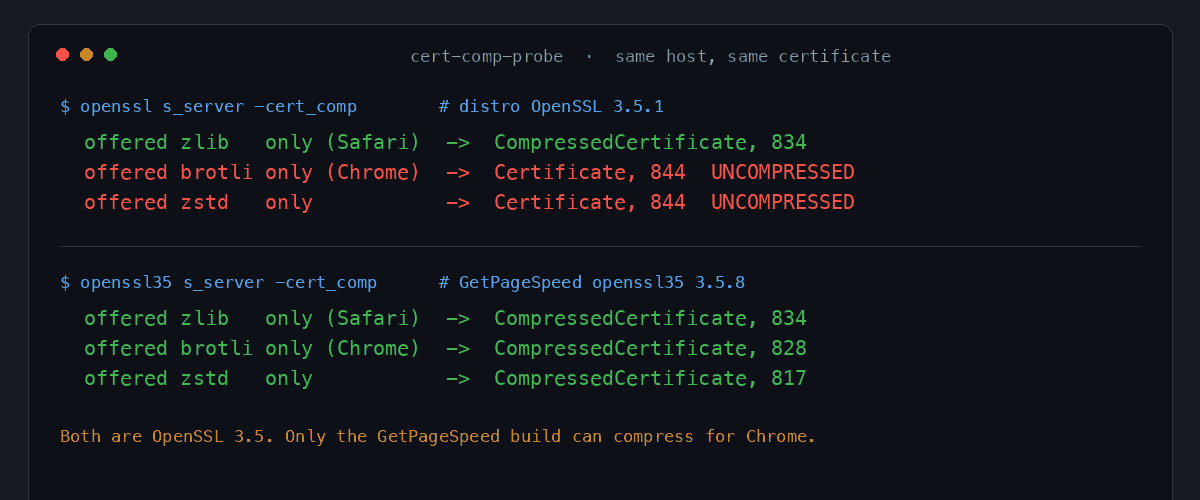

The same asymmetry shows up on the client side, and you can check it in one command. Compare the compress_certificate extension your OpenSSL sends:
echo | openssl s_client -connect www.getpagespeed.com:443 \
    -servername www.getpagespeed.com -trace 2>/dev/null | grep compress_certificate
The distribution client reports length=3, which is a list holding exactly one algorithm. Our openssl35 client reports length=7, which is three.
Enabling NGINX certificate compression
One directive, valid in the http and server blocks (and in stream for TCP/UDP proxying). It defaults to off:
server {
    listen 443 ssl;
    http2 on;
    server_name www.example.com;

    ssl_certificate     /etc/letsencrypt/live/www.example.com/fullchain.pem;
    ssl_certificate_key /etc/letsencrypt/live/www.example.com/privkey.pem;

    ssl_protocols TLSv1.2 TLSv1.3;

    # RFC 8879. TLS 1.3 clients only; everyone else gets the plain chain.
    ssl_certificate_compression on;

    ssl_session_cache   shared:SSL:10m;
    ssl_session_timeout 1d;
}
Then:
sudo nginx -t && sudo systemctl reload nginx
It is not valid in a location block, and NGINX says so rather than ignoring it:
nginx: [emerg] "ssl_certificate_compression" directive is not allowed here
That configuration passes gixy, our NGINX configuration static analyser, with no findings.
The directive that stops NGINX from starting
Add ssl_certificate_compression on; to a typical hardened configuration and you will most likely get this:
nginx: [emerg] "ssl_stapling" is incompatible with "ssl_certificate_compression"
nginx: configuration file /etc/nginx/nginx.conf test failed
This is not a warning that gets ignored. It is a hard configuration error, and NGINX will not start.
The reason is mechanical. NGINX compresses the certificate chain once, at configuration time, and caches the compressed blob for every handshake. OCSP stapling injects a per-response OCSP staple into the Certificate message, so the message is no longer constant and the pre-computed blob is no longer valid. Upstream chose to reject the combination outright rather than silently disable one of the two.
So you must pick one. For most sites in 2026 that choice is easy, because OCSP stapling is on its way out:
- Let’s Encrypt shut down its OCSP responders on 6 August 2025, and certificates issued after May 2025 carry a CRL URL instead of an OCSP URL. If you use Let’s Encrypt,
ssl_stapling on;is already doing nothing. Delete it and turn on compression. - Other CAs still publish an OCSP responder. Our own certificate, issued by ZeroSSL, still carries an
OCSP - URIpointing at Sectigo’s responder.
Check which case you are in before deciding:
echo | openssl s_client -connect www.example.com:443 \
    -servername www.example.com 2>/dev/null | openssl x509 -noout -ocsp_uri
Empty output means stapling has nothing to staple, so compression is free. If your CA still runs OCSP and you rely on stapling, keep stapling. Certificate compression is an optimisation; revocation checking is a security control, and this article is not going to tell you to trade one for the other.
Verifying NGINX certificate compression
The straightforward check is whether the server sends CompressedCertificate instead of Certificate:
echo | openssl35 s_client -connect www.example.com:443 \
    -servername www.example.com -trace 2>/dev/null \
    | grep -E "CompressedCertificate|Certificate, Length"
A working server answers with a line like CompressedCertificate, Length=3746. For the uncompressed baseline, tell the client not to accept compression:
echo | openssl35 s_client -connect www.example.com:443 \
    -servername www.example.com -no_rx_cert_comp -trace 2>/dev/null \
    | grep "Certificate, Length"
The difference between those two numbers is what you saved. (-trace reports the message body, so its figures run four bytes below the tables further down, which count the handshake header too. Compare like with like and the saving is identical.)
One caveat that matters. A stock s_client offers every algorithm its build supports and shows you only the winner. It therefore cannot answer “does zstd work on this server”, and it cannot tell you whether Chrome specifically is being served. To answer that you have to restrict the offer to one algorithm, which is what SSL_CTX_set1_cert_comp_preference is for, and which is how every per-algorithm number in this article was produced.
What NGINX certificate compression saves
Measured on Rocky Linux 10 with nginx 1.30.4 and openssl35-libs 3.5.8-4, against a two-certificate RSA-2048 chain:
| Client offers | Message | Bytes | Saving |
|---|---|---|---|
| nothing | Certificate | 1636 | baseline |
| zlib (Safari) | CompressedCertificate | 1448 | 11.5% |
| brotli (Chrome) | CompressedCertificate | 1411 | 13.8% |
| zstd | CompressedCertificate | 1407 | 14.0% |
Real chains do better, because real chains are bigger and contain more repeated structure. Against www.getpagespeed.com in production:
| Client offers | Message | Bytes | Saving |
|---|---|---|---|
| nothing | Certificate | 4735 | baseline |
| zlib (Safari) | CompressedCertificate | 3905 | 17.5% |
| zstd | CompressedCertificate | 3919 | 17.2% |
| brotli (Chrome) | CompressedCertificate | 3750 | 20.8% |
Brotli wins on both, which is convenient given that Chrome is the browser that only speaks brotli. When a client offers all three, our servers pick brotli.
Two honest limits on the benefit. Certificate compression only applies to full handshakes, so a resumed session skips it entirely, which is another argument for a healthy ssl_session_cache. And it does nothing for TLS 1.2 clients, since the extension does not exist there.
Where NGINX certificate compression is available
The directive arrived in NGINX 1.29.1 (July 2025). Distribution packages are nowhere near that:
| Platform | Distribution NGINX | GetPageSpeed NGINX | Directive available? |
|---|---|---|---|
| RHEL 9 and clones | 1.20.1 | 1.30.4 | Ours only |
| RHEL 10 and clones | 1.26.3 | 1.30.4 | Ours only |
| Ubuntu 24.04 LTS | 1.24.0 | 1.30.4 | Ours only |
| Ubuntu 22.04 LTS | 1.18.0 | 1.30.4 | Ours only |
| Ubuntu 20.04 LTS | 1.18.0 | 1.30.4 | Ours only |
| Debian 12 (bookworm) | 1.22.1 | 1.30.4 | Ours only |
| Debian 13 (trixie) | 1.26.3 | 1.30.4 | Ours only |
So both halves have to come from the same place: an NGINX new enough to have the directive, and an OpenSSL built with all three algorithms. Our packages ship both, on RHEL 7 through 10 and clones, Amazon Linux, and Ubuntu 20.04 / 22.04 / 24.04 LTS plus Debian 12 and 13.
RHEL 7 deserves a note, because it is usually where this kind of thing stops. It did not: libzstd on EL7 lives only in EPEL, and a hard EPEL dependency on openssl35-libs would have been unacceptable, so we package zstd for EL7 ourselves. extras.getpagespeed.com is an EL7 host, and it serves all three algorithms:
| Client offers | Message | Bytes |
|---|---|---|
| nothing | Certificate | 4726 |
| zlib only | CompressedCertificate | 3899 |
| zstd only | CompressedCertificate | 3920 |
| brotli only | CompressedCertificate | 3758 |
Because the algorithms are a property of the OpenSSL build rather than of NGINX, upgrading openssl35-libs unlocks them for an NGINX binary you already have. No rebuild is needed. It does need a restart rather than a reload, though: workers fork from the master process, which keeps the old library mapped, so a reload will leave you with the old algorithm set and no error message.
Troubleshooting NGINX certificate compression
nginx: [emerg] "ssl_stapling" is incompatible with "ssl_certificate_compression". Exactly what it says. Remove ssl_stapling (and ssl_stapling_verify), or remove the compression directive. See the section above for how to decide.
unknown directive "ssl_certificate_compression". Your NGINX predates 1.29.1. Check with nginx -v and install a current build.
Configuration is accepted, but the client still gets Certificate. Three candidates, in order of likelihood. Your client is not TLS 1.3, so the extension does not exist. Your client offers only algorithms your server’s OpenSSL lacks, which is the Chrome-on-distro-OpenSSL case above. Or something in front of NGINX, a CDN or a cloud load balancer, is terminating TLS and its stack is the one that counts.
You upgraded openssl35-libs and nothing changed. Reload is not enough. Run systemctl restart nginx.
A log line reading "ssl_certificate_compression" is not supported on this platform, ignored. NGINX is linked against a TLS library with no certificate compression support at all. Check nginx -V.
Conclusion
A TLS stack is only as good as its next package upgrade. A library update or a copied hardening snippet can silently undo the handshake behaviour you just verified. GetPageSpeed Amplify runs scheduled gixy scans across every host and ties findings to live NGINX runtime metrics. Drop-in compatible with the deprecated nginx-amplify-agent (EOL January 2026).
NGINX certificate compression is a rare thing: a real saving on every fresh handshake, for one line of configuration, with a safe fallback and no runtime cost. The work is in the packaging, not the tuning.
- Install NGINX from our repository so you have 1.29.1 or newer linked against an OpenSSL with all three algorithms.
- Remove
ssl_staplingif your CA no longer runs an OCSP responder. - Add
ssl_certificate_compression on;. - Confirm with
openssl s_client -tracethat you getCompressedCertificate, and check the brotli path specifically, because that is the one Chrome uses.
If you want the rest of the picture, this is the third piece of the same OpenSSL 3.5 stack: Encrypted Client Hello hides the hostname, post-quantum key exchange protects the session against harvest-now-decrypt-later, and certificate compression makes the handshake smaller. Our SSL test audits a live host across all of it.
Subscribe to the GetPageSpeed repository to get this NGINX and OpenSSL 3.5 stack, along with 100+ NGINX modules built against it.