


📅 Updated: August 16, 2026 (Originally published: April 1, 2026)
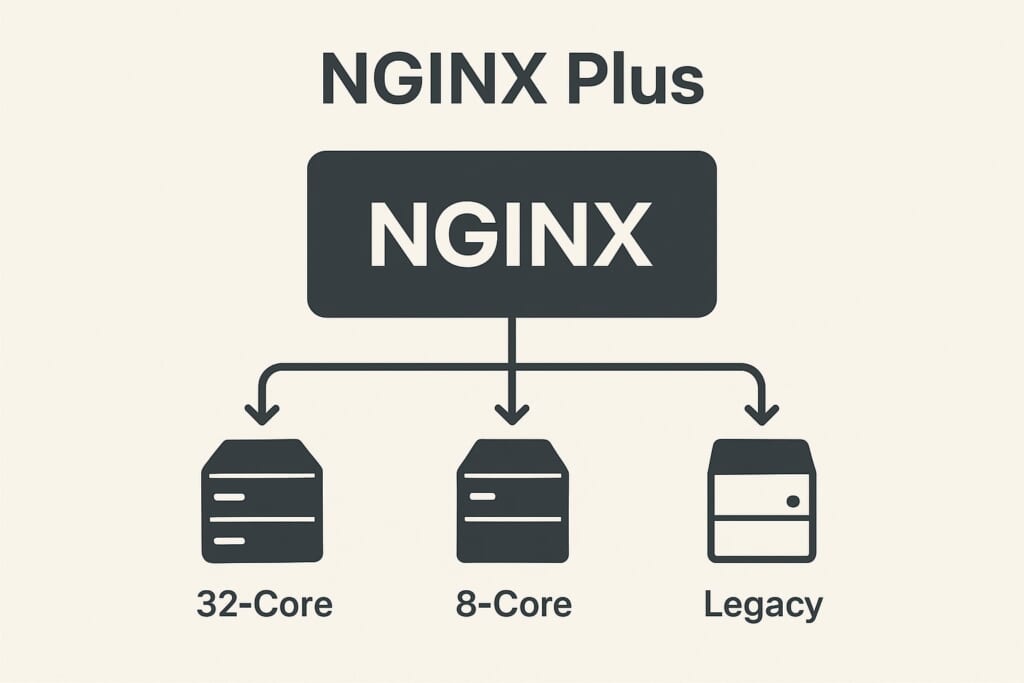
You have three backend servers behind NGINX. One is a beefy 32-core machine, another is a modest 8-core VPS, and the third is a legacy box you keep around for redundancy. Round-robin sends them equal traffic regardless of how busy each server actually is. least_conn counts open connections but cannot tell whether a server is actively processing a complex request or just holding an idle keepalive connection. Your slow server falls behind, response times spike, and users notice.
This is the fundamental problem with connection-unaware load balancing: NGINX has no visibility into which backends are actually busy. NGINX Plus solves this with the least_time directive — but at $3,675 per year per instance. The Angie web server fork added sticky session support from Plus, but did not port least_time either.
The upstream-fair module brings NGINX fair load balancing to the open-source ecosystem. It tracks in-flight requests per backend in shared memory, ensuring every worker process has a global view of server busyness. The result: faster backends automatically receive more traffic, slower ones get relief, and your users see consistently low response times — all without a commercial license.
How the Fair Algorithm Works
Unlike round-robin (which ignores server state) or least_conn (which counts connections per worker), the fair module maintains a shared memory zone that tracks the number of active requests on each backend across all NGINX worker processes.
When a new request arrives, the algorithm works in two phases:
Phase 1 — Find an idle backend. The module first scans for backends with zero (or below-weight) active requests. If one is found, it gets the request immediately. This ensures that idle servers are never left sitting while busy ones accumulate more work.
Phase 2 — Score busy backends. When all backends are active, the module calculates a scheduling score for each:
score = (active_requests << 20) | (~requests_since_last_used & 0xFFFFF)
The score combines two factors:
– Active request count (high bits) — fewer active requests means a lower score
– Idle time (low bits) — longer since last used means a lower score
The backend with the lowest score wins. In default mode, the score is further divided by the server’s effective weight adjusted for recent failures, so higher-capacity servers naturally attract more traffic.
This approach is fundamentally different from NGINX Plus least_time, which measures actual response latency. The fair module instead infers busyness from request concurrency — a server processing 10 requests simultaneously is likely busier than one processing 2, regardless of measured latency.
Accuracy Limits
The scoring formula uses 20 bits for the idle-time component. This means:
- Exact fairness for up to ~4,000 concurrent requests per backend
- Overall accuracy for up to ~1 million concurrent requests across all backends
- Beyond these limits, the algorithm gracefully degrades to weighted round-robin
For the vast majority of deployments, these limits are never reached.
Fair vs. least_conn vs. least_time: Choosing the Right Algorithm
Each NGINX fair load balancing scenario requires understanding the trade-offs between available algorithms. Here is how they compare:
| Feature | Round-Robin | least_conn |
fair |
least_time (Plus) |
|---|---|---|---|---|
| What it tracks | Nothing | Connection count | Active requests + idle time | Response time + connections |
| Cross-worker visibility | No | Per-worker only | Yes (shared memory) | Yes (shared memory) |
| Weight-aware | Yes | Yes | Yes | Yes |
| Cost | Free | Free | Free (module) | NGINX Plus |
| Best for | Homogeneous servers | Long-lived connections | Mixed-speed backends | Latency-sensitive apps |
When to Choose fair Over least_conn
The least_conn directive counts connections per worker process independently. With 4 worker processes, each worker only sees its own connections — not the global picture. Additionally, least_conn counts all connections equally, whether the server is actively processing a request or simply holding an idle keepalive connection.
The fair module solves both problems: it uses shared memory for global visibility and tracks active requests, not just open connections. Choose NGINX fair load balancing when:
- Backends have different processing speeds — a database-heavy API server versus a fast static-file server
- Request durations vary significantly — some endpoints take 50ms, others take 5 seconds
- You run multiple NGINX worker processes and need accurate cross-worker load tracking
- Keepalive connections would skew
least_connresults
How Angie Compares
Angie, the notable NGINX fork, has ported the sticky session persistence directive from NGINX Plus — making cookie-based session affinity available in open source. However, Angie has not added least_time or any response-time-aware load balancing. For load-aware distribution on Angie, the upstream-fair module remains the best option, as it is compatible with Angie’s NGINX-based architecture.
Installation
RHEL, CentOS, AlmaLinux, Rocky Linux
sudo dnf install https://extras.getpagespeed.com/release-latest.rpm
sudo dnf install nginx-module-upstream-fair
Enable the module by adding the following line at the top of /etc/nginx/nginx.conf:
load_module modules/ngx_http_upstream_fair_module.so;
Verify the module loads correctly:
nginx -t
For more details and version history, see the upstream-fair RPM module page.
Debian and Ubuntu
First, set up the GetPageSpeed APT repository, then install:
sudo apt-get update
sudo apt-get install nginx-module-upstream-fair
On Debian/Ubuntu, the package handles module loading automatically. No
load_moduledirective is needed.
See also: upstream-fair APT module page.
Configuration
Basic Usage
Add the fair directive inside an upstream block to enable fair load balancing:
upstream backend {
    fair;
    server 192.168.1.10:8080;
    server 192.168.1.11:8080;
    server 192.168.1.12:8080;
}

server {
    listen 80;
    location / {
        proxy_pass http://backend;
    }
}
That is the minimal configuration. Requests will now be routed to the least busy backend based on active request counts.
Directive Reference
fair
Context: upstream
Syntax: fair [weight_mode=idle|peak] [no_rr]
Default: weight-aware fair scheduling
The fair directive accepts optional parameters that change how the algorithm selects backends:
- No parameters (default) — weight-aware scheduling that accounts for server failures. A backend with
weight=5receives roughly five times the traffic of one withweight=1, adjusted by the current failure count. weight_mode=idle— prioritizes completely idle backends. In this mode, the algorithm prefers a server with zero active requests over one already handling traffic, even if that server has higher capacity. Useful when backends are lightweight and quick to start processing.weight_mode=peak— caps concurrent requests at each server’s weight value. A server withweight=3will not receive a 4th concurrent request until other servers are equally loaded. This protects slower backends from being overwhelmed during traffic spikes.no_rr— disables the round-robin fallback. Without this flag, when multiple backends are equally idle, the algorithm cycles through them. Withno_rr, the same idle backend is reused. This is primarily useful combined withweight_mode=idlefor on-demand backend processes that should receive traffic only when already warmed up.
Note: weight_mode=idle and weight_mode=peak are mutually exclusive. Specifying both causes a configuration error.
upstream_fair_shm_size
Context: http
Syntax: upstream_fair_shm_size size
Default: 32k (8 memory pages)
Minimum: 32k
Configures the shared memory zone size used to track request counts across worker processes:
upstream_fair_shm_size 64k;
The default 32KB is sufficient for most deployments with a moderate number of upstream servers. Increase this value if you have many upstream blocks or servers and see “upstream_fair_shm_size too small” warnings in the error log.
Important: Changing upstream_fair_shm_size requires a full NGINX restart (systemctl restart nginx). A reload is not sufficient because shared memory zones are allocated at startup.
Real-World Examples
Mixed Backend Environment
When backends have different capacities, combine NGINX fair load balancing with server weights:
upstream api_servers {
    fair;
    server 10.0.0.1:8080 weight=5;  # 32-core production server
    server 10.0.0.2:8080 weight=3;  # 16-core server
    server 10.0.0.3:8080 weight=1;  # 4-core standby server
}
The fair algorithm uses weights when scoring backends, so the 32-core server naturally absorbs more traffic — but only when it has capacity. If it becomes overloaded, traffic automatically shifts to the other servers.
Protecting Slow Backends with Peak Mode
Use weight_mode=peak to enforce hard concurrency limits per backend:
upstream mixed_backends {
    fair weight_mode=peak;
    server 10.0.0.1:8080 weight=10;  # Fast server: up to 10 concurrent
    server 10.0.0.2:8080 weight=3;   # Slow server: max 3 concurrent
}
In peak mode, the slow server will never receive a 4th concurrent request, preventing it from becoming a bottleneck. Once all servers hit their weight cap, NGINX falls back to score-based selection.
Production Configuration with Health Checks
A complete production setup combining fair load balancing with health monitoring and connection optimization:
upstream backend_api {
    fair;
    server 10.0.0.1:8080 weight=5 max_fails=3 fail_timeout=30s;
    server 10.0.0.2:8080 weight=3 max_fails=3 fail_timeout=30s;
    server 10.0.0.3:8080 weight=1 max_fails=3 fail_timeout=30s;

    keepalive 16;
}

server {
    listen 80;

    location / {
        proxy_pass http://backend_api;
        proxy_http_version 1.1;
        proxy_set_header Connection "";
        proxy_set_header Host $host;
        proxy_set_header X-Real-IP $remote_addr;
        proxy_set_header X-Forwarded-For $proxy_add_x_forwarded_for;

        proxy_connect_timeout 5s;
        proxy_read_timeout 60s;

        proxy_next_upstream error timeout http_502 http_503 http_504;
        proxy_next_upstream_tries 3;
    }
}
If a backend fails 3 times within 30 seconds, NGINX marks it as unavailable and stops sending traffic. The fair module automatically redistributes load among the remaining healthy servers. After 30 seconds, NGINX retries the failed backend.
For additional resilience, consider adding active health checks that proactively detect failures rather than waiting for real user requests to fail.
Testing Your Configuration
After configuring NGINX fair load balancing, verify it works correctly.
First, check the configuration syntax:
nginx -t
Then reload NGINX:
systemctl reload nginx
To observe the distribution, send multiple concurrent requests and check which backend handled each one. Add the X-Backend header in your upstream servers or use NGINX’s add_header directive with the $upstream_addr variable:
For TCP and UDP upstreams, NGINX stream monitoring provides shared-zone traffic and status metrics beyond this per-request header.
location / {
    proxy_pass http://backend_api;
    add_header X-Upstream $upstream_addr always;
}
Then test with concurrent requests:
for i in $(seq 1 10); do
    curl -sI http://localhost/ | grep X-Upstream &
done
wait
Under concurrent load, you should see faster backends serving more requests than slower ones.
Performance Considerations
The fair module adds minimal overhead compared to round-robin:
- Shared memory usage is small — the default 32KB zone handles most deployments
- Locking overhead exists because workers must read/update shared counters, but the critical section is very short (incrementing/decrementing an integer)
- No external dependencies — the module is self-contained with no additional services or agents required
- Graceful degradation — if active request counts exceed the 20-bit scoring precision (~4,000 per backend), the algorithm smoothly falls back to weighted round-robin rather than failing
For high-traffic sites processing tens of thousands of requests per second, the shared memory approach actually improves overall performance by preventing backend overload — even though each individual routing decision costs slightly more than round-robin.
Troubleshooting
“upstream_fair_shm_size too small”
This warning appears in the error log when the shared memory zone runs out of space. Increase the size:
upstream_fair_shm_size 128k;
Remember to restart (not reload) NGINX after changing this value.
Module Not Loading
If nginx -t reports “unknown directive fair”, verify the load_module line is present at the top of nginx.conf:
load_module modules/ngx_http_upstream_fair_module.so;
Check that the module file exists:
ls -la /usr/lib64/nginx/modules/ngx_http_upstream_fair_module.so
Traffic Not Distributing as Expected
With sequential requests (one at a time), NGINX fair load balancing distributes roughly evenly because each request completes before the next arrives — all backends appear equally idle. The benefits of fair balancing become visible under concurrent load, where some backends become busy while others remain available.
If all traffic goes to one server, check:
– Whether no_rr is accidentally enabled
– Whether other backends are failing health checks (check the error log)
– Whether you are testing with concurrent requests, not sequential ones
Conclusion
The upstream-fair module fills an important gap in the open-source NGINX ecosystem. While least_conn offers basic connection-aware balancing, and NGINX Plus provides sophisticated least_time routing, the fair module delivers cross-worker, request-aware load distribution at no cost.
Use NGINX fair load balancing when your backends have different processing speeds, when request durations vary, or when you need accurate load tracking across multiple NGINX worker processes. For more load balancing options including round-robin, IP hash, consistent hashing, and sticky sessions, see the complete NGINX load balancing guide.
The module source code is available on GitHub.
Upstream config moves faster than security review. Continuous scanning catches the lag between an upstream change and the next manual audit. GetPageSpeed Amplify runs scheduled gixy scans across every host and ties findings to live NGINX runtime metrics. Drop-in compatible with the deprecated nginx-amplify-agent (EOL January 2026).