


You enabled HTTP/3. For most visitors it is as fast as promised. Then someone on another continent tells you that pages hang halfway, and a 1 MB file takes nine seconds. The same file over HTTP/2 arrives in under two. You are looking at an NGINX HTTP/3 slowdown that never reaches the error log.
If NGINX HTTP/3 is slow for some visitors and fine for others, their network is only half of the story. One packet lost in the first second of a QUIC connection is enough to put NGINX into a state it never leaves. As a result, the whole connection crawls until the visitor closes the tab.
We found this on our own site, reproduced it in a lab, and fixed it. This article shows the bug in the code, the measurements, and the fix that ships in NGINX-MOD 1.30.6-78.
Symptoms of the NGINX HTTP/3 Slowdown
This NGINX HTTP/3 slowdown is easy to miss, because it never shows up on a fast, clean link. Here is what it looks like from the outside:
- Downloads are either fast or very slow, with nothing in between. The same URL from the same client takes 1.6 seconds on one connection and 9 seconds on the next.
- Only HTTP/3 is affected. HTTP/2 from the same server to the same client is fine.
- It gets worse with distance. The slowdown is proportional to the round-trip time, so intercontinental and mobile visitors suffer most.
- Browsers stall when they load many files at once. All requests share one QUIC connection. If that connection is crippled, images time out and scripts arrive late.
- Nothing is logged. There is no error, no warning, and no hint at any normal log level.
For example, this is what we measured against our own production server from a client 190 ms away. We downloaded the same 1 MB range sixteen times, each time from a different source port:
| Connections | Time for 1 MB over HTTP/3 |
|---|---|
| 9 of 16 | 1.56 to 1.64 seconds |
| 7 of 16 | 6.7 to 9.1 seconds |
The slow connections had one thing in common. In each of them, a single packet of the TLS handshake was lost on the way to the client.
How NGINX Controls Its Sending Speed
To understand the bug, you need three terms from congestion control.
The congestion window is the amount of data a server may have in flight, sent but not yet acknowledged. A new QUIC connection in NGINX starts with a window of 10 packets.
During slow start, the window doubles every round trip. Despite the name, this is the fast phase. It is how a connection reaches a useful speed within a second.
When a packet is lost, the server assumes congestion. It shrinks the window and records a slow start threshold. Above that threshold the window grows slowly, by a few packets per round trip at best.
NGINX has used the CUBIC algorithm for QUIC since version 1.27.5. After a loss, CUBIC is supposed to shrink the window to 70 % of its size. That is a sensible reaction. However, NGINX computes the new size from the wrong number.
The Root Cause: One Line in the Loss Handler
The code lives in src/event/quic/ngx_event_quic_ack.c. The function ngx_quic_congestion_lost() runs whenever NGINX declares a packet lost:
    cg->in_flight -= f->plen;
    f->plen = 0;

    /* ... */

    /* RFC 9438, 4.6. Multiplicative Decrease */

    cg->mtu = qc->path->mtu;
    cg->recovery_start = now;
    cg->w_prior = cg->window;
    /* RFC 9438, 4.7. Fast Convergence */
    cg->w_max = (cg->window < cg->w_max)
                ? cg->window * (10 + NGX_QUIC_CUBIC_BETA) / 20 : cg->window;
    cg->ssthresh = cg->in_flight * NGX_QUIC_CUBIC_BETA / 10;
    cg->window = ngx_max(cg->ssthresh, cg->mtu * 2);
The threshold is derived from in_flight, the number of bytes still unacknowledged. Look at the first line, though. By the time the threshold is computed, in_flight no longer includes the lost packet. It also no longer includes the packets that were acknowledged a moment earlier by the same ACK frame.
Now consider the TLS handshake. The server sends its certificate in one flight of several datagrams. Suppose the last datagram is lost. The client acknowledges everything else. Nothing newer has been sent, so NGINX only notices the loss after a probe timeout. At that moment in_flight is exactly zero. Therefore:
ssthreshbecomes 0 x 0.7 = 0.- The window becomes the minimum, 2 packets.
- The window is above the threshold, so slow start never comes back.
From then on the window grows by a fraction of a packet per round trip at first. On a 200 ms path, a 1 MB response that should take 1.65 seconds takes more than 9.
The debug log of a stock build shows the collapse directly. win is the new window in bytes and if is the bytes in flight:
quic congestion lost t:... win:2400 if:0
This is tracked upstream as nginx issue #1925. It was reported on November 2, 2026, and is open at the time of writing. The same line is present in Angie.
Measuring It in a Lab
Field measurements are noisy, so we built a lab. It runs three network namespaces: a client, a router, and a server. The router adds delay and can drop exactly one chosen datagram of every connection. The server uses a chain of three RSA certificates, the size of a common commercial chain. As a result, its first handshake flight spans six datagrams.
First, we dropped only the last datagram of that flight and nothing else. Each cell is the median of at least ten downloads on stock NGINX 1.30.6:
| Round trip | File | One handshake packet lost | No loss at all |
|---|---|---|---|
| 200 ms | 1 MB | 9.38 s | 1.65 s |
| 200 ms | 4 MB | 12.74 s | 2.52 s |
| 100 ms | 1 MB | 5.27 s | 0.91 s |
One lost packet out of several hundred makes the download more than five times slower.
Random loss tells the same story and explains why NGINX HTTP/3 slow downloads look random in the field. With 1 % of packets lost in both directions, most downloads were still fast. However, about one in six was slow, and the 90th percentile was 8.6 seconds against a median of 1.7. In addition, across all our random-loss runs, 5 of 240 downloads on the stock build never finished the handshake within the client’s 10 second limit.
The Fix in NGINX-MOD
The upstream issue proposes a small change: derive the threshold from the congestion window, as RFC 9002 describes. It is correct, and it removes the collapse to 2 packets. We built it and measured it on its own. Unfortunately, it is not enough. In the handshake scenario the window is still only 10 packets when the loss happens. Seventy percent of that is 7 packets, and the connection has already left slow start. The 1 MB download improves from 9.4 to 8.4 seconds.
NGINX-MOD 1.30.6-78 goes further. It corrects the window calculation, and it also changes how the congestion controller reacts to a loss during the handshake. As a result, one unlucky packet no longer decides the speed of the whole connection. Losses of regular data still get the standard CUBIC response. The same download now takes 2.4 seconds.
A Word on Standards
We want to be precise here. The first part of the fix is plain RFC 9002. The second part is a deliberate, bounded trade-off. For the handful of packets that make up the handshake, NGINX-MOD is more forgiving than a strict reading of the RFC. We accept that, because the alternative is a connection that stays slow for its whole life.
The standards-clean answer is different in kind. It is a rate-based congestion controller with packet pacing, the approach Linux TCP takes with BBR. RFC 9002 explicitly allows other controllers. NGINX has neither: a request for BBR has been open since March 2025, and two pacing pull requests, #1735 and #1825, are unmerged. That is a larger piece of work, and it is next on our list for NGINX-MOD.
Before and After
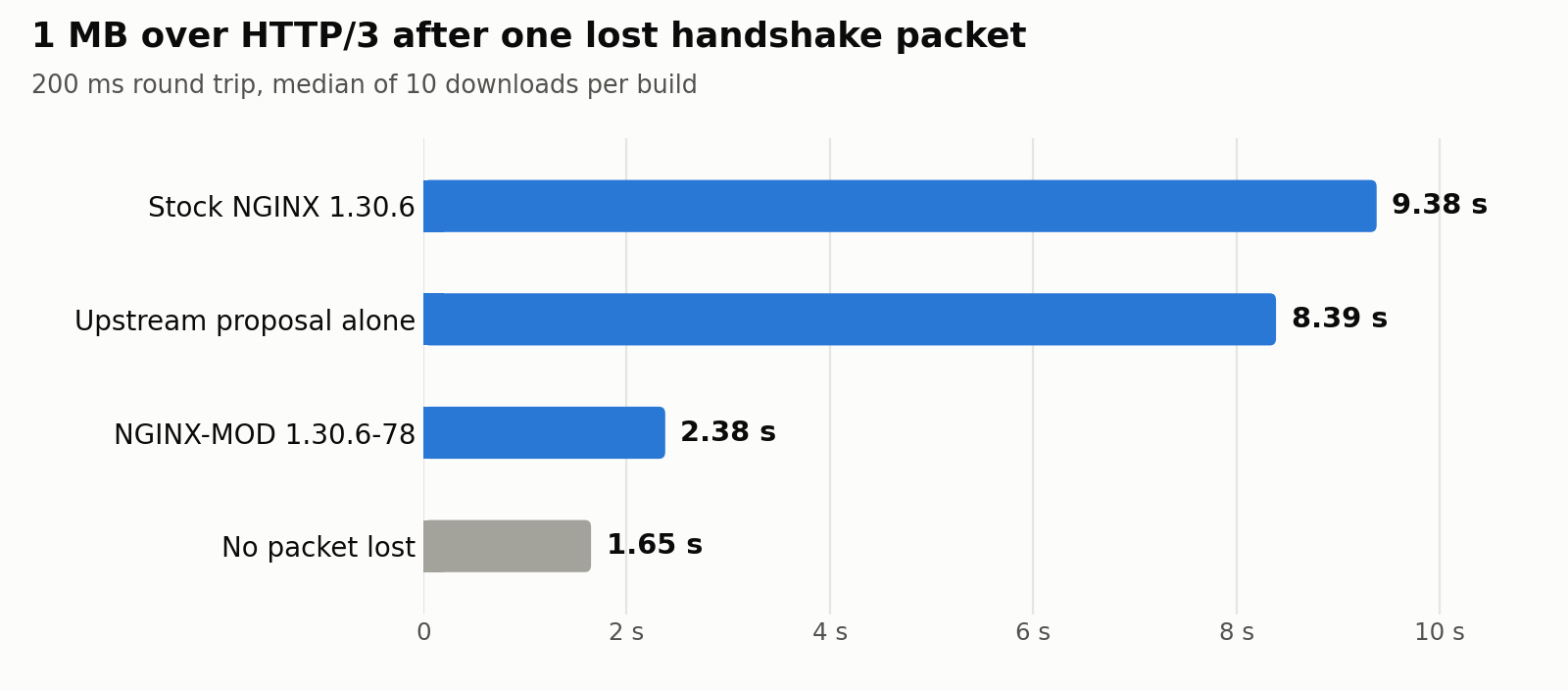

Here is the handshake scenario again, with all three builds. Each cell is the median of at least ten 1 MB downloads:
| Round trip | Stock 1.30.6 | Upstream proposal alone | NGINX-MOD 1.30.6-78 | No loss |
|---|---|---|---|---|
| 200 ms | 9.38 s | 8.39 s | 2.38 s | 1.65 s |
| 100 ms | 5.27 s | 4.28 s | 1.23 s | 0.91 s |
Next, random loss in both directions at a 200 ms round trip, with 40 downloads per cell:
| Loss | Build | Median | 90th percentile |
|---|---|---|---|
| 1 % | Stock 1.30.6 | 1.66 s | 8.62 s |
| 1 % | NGINX-MOD 1.30.6-78 | 1.75 s | 2.67 s |
| 2 % | Stock 1.30.6 | 2.29 s | 16.61 s |
| 2 % | NGINX-MOD 1.30.6-78 | 1.94 s | 4.98 s |
The typical download barely changes, because it was never the problem. The slow tail shrinks three to five times. Furthermore, none of the 240 downloads on the NGINX-MOD build failed the handshake.
Finally, production. We upgraded our own server and repeated the test from the same client on the same sixteen source ports, two minutes later:
| Build | Connections with a clean handshake | Connections that lost a handshake packet |
|---|---|---|
| NGINX-MOD 1.30.6-73 | 1.56 to 1.64 s | 6.7 to 9.1 s |
| NGINX-MOD 1.30.6-78 | 1.55 to 1.57 s | 2.22 to 2.30 s |
The network still loses the packet. The connection simply recovers now.
Get the Fix
The fix ships in NGINX-MOD 1.30.6-78 for RHEL, CentOS, AlmaLinux, Rocky Linux, Fedora, and Amazon Linux. NGINX-MOD is our NGINX build with fixes and features that upstream does not ship. You will not find this one in stock NGINX.
Requires a Pro subscription or higher.If you already run NGINX-MOD, update it. The package replaces the running binary gracefully, so no restart is needed:
sudo dnf -y update nginx-mod
If you run the standard nginx package, enable the NGINX-MOD repository and swap the packages. Your configuration stays as it is:
sudo dnf -y install https://extras.getpagespeed.com/release-latest.rpm
sudo dnf config-manager --enable getpagespeed-extras-nginx-mod
sudo dnf -y swap nginx nginx-mod
sudo systemctl enable --now nginx
On CentOS 7, use yum and yum-config-manager --enable in place of dnf and dnf config-manager --enable.
Then confirm the release. It must be 78 or later:
rpm -q nginx-mod
rpm -q --changelog nginx-mod | head -n 9
The newest changelog entry starts with “HTTP/3: one packet lost early in a connection no longer slows down”.
The Debian and Ubuntu build of NGINX-MOD does not carry this fix yet.
Configuration That Helps
The fix repairs the congestion logic. Two directives matter on any build. This server block is trimmed to the directives that matter here:
server {
    listen 443 quic reuseport;
    listen 443 ssl;
    http2 on;
    http3 on;
    server_name example.com;

    ssl_certificate     /etc/pki/tls/certs/example.com.crt;
    ssl_certificate_key /etc/pki/tls/private/example.com.key;
    ssl_certificate_compression on;

    http3_stream_buffer_size 1m;

    add_header Alt-Svc 'h3=":443"; ma=86400' always;

    root /usr/share/nginx/html;
}
http3_stream_buffer_size
This is the most important HTTP/3 directive for distant visitors, and it has nothing to do with packet loss. NGINX buffers up to this much unacknowledged data per stream. Therefore a stream cannot move more than one buffer per round trip. The default is 64k.
We measured both values on stock NGINX without any loss:
| Round trip | File | Default 64k | http3_stream_buffer_size 1m |
|---|---|---|---|
| 200 ms | 1 MB | 3.70 s | 1.65 s |
| 200 ms | 4 MB | 13.16 s | 2.52 s |
| 100 ms | 1 MB | 1.92 s | 0.91 s |
With the default, a 4 MB file on a 200 ms path takes 13 seconds on a perfect network. The larger buffer costs memory per active stream, so size it for your traffic. For a typical download from far away, this directive matters more than any congestion fix.
However, it does not help with the collapse described above. Our own server already had http3_stream_buffer_size 1m when we measured the 9 second downloads. The buffer sets how fast a healthy connection can go. The bug pins the window far below that limit, so only the fix in NGINX-MOD brings those connections back.
ssl_certificate_compression
A smaller handshake flight means fewer datagrams that can be lost. With ssl_certificate_compression on, available since NGINX 1.29.1 on an OpenSSL build with compression support, the server compresses its certificate chain for clients that ask for it. Chrome does. On our server this shrank the first flight from 6,888 to 5,841 bytes, from six datagrams to five.
You can check that compression is active with openssl:
echo | openssl s_client -connect example.com:443 -servername example.com -msg 2>/dev/null \
    | grep -E 'CompressedCertificate|, Certificate$'
A line with CompressedCertificate means the chain was sent compressed.
If you are setting up HTTP/3 from scratch, start with our guide on enabling NGINX HTTP/3.
Testing: Is This Happening to You?
From the Client Side
You need a curl with HTTP/3 support. On RHEL-based systems, our curl-latest package provides one. Download the same large file several times from fixed source ports, then compare with HTTP/2:
for port in $(seq 61001 61016); do
    curl-latest -s -o /dev/null --http3-only --local-port "$port" \
        -w "$port %{http_code} %{time_total}\n" https://example.com/1m.bin
done

curl-latest -s -o /dev/null --http2 \
    -w "h2 %{http_code} %{time_total}\n" https://example.com/1m.bin
Run it from a distant client, not from the server itself. If some HTTP/3 downloads take several times longer than the rest while HTTP/2 stays steady, you are looking at the NGINX HTTP/3 slowdown described here.
From the Server Side
The debug log shows the congestion decisions. Enable it for one client address only, in the events block:
events {
    worker_connections 1024;
    debug_connection 203.0.113.10;
}
Debug logging needs the debug binary, which both the stock packages and ours ship as nginx-debug:
sudo systemctl stop nginx
sudo systemctl start nginx-debug
grep 'quic congestion lost' /var/log/nginx/error.log
On an affected build, a slow connection logs a line ending in win:2400 if:0. On NGINX-MOD 1.30.6-78, the window after the same event is still the full initial window, win:12000.
Switch back to the regular binary when you are done:
sudo systemctl stop nginx-debug
sudo systemctl start nginx
Performance Considerations
The changed code only runs when NGINX declares a packet lost. On a clean link, NGINX-MOD and stock NGINX behave the same. In our lab both needed 1.65 seconds for 1 MB without loss.
After a handshake loss, NGINX-MOD may send one extra round of packets into a path that is congested right at connection start. The first lost data packet then triggers the normal reduction.
Our lab uses independent random loss, one download per connection, and one client implementation. Bursty loss and many parallel streams are not covered by these numbers.
Security Best Practices
The fix adds no directive and no listener. It never raises the congestion window above what a connection without loss would use. The window and the QUIC anti-amplification limit still bound what the server sends to any client.
Keep the debug log scoped. A global error_log ... debug on a busy server writes gigabytes and records request details. debug_connection with a single address avoids both.
Troubleshooting
The update did not change anything. Check rpm -q nginx-mod. A release below 78 does not contain the fix. Also confirm that the client really uses HTTP/3: curl-latest --http3-only fails outright when UDP port 443 is blocked.
Is NGINX HTTP/3 slow on every connection, not just on some? That is a different problem. Start with http3_stream_buffer_size, then look at UDP buffer sizes and whether UDP is rate-limited on the path.
HTTP/3 breaks after nginx -s reload. That is the QUIC reload bug, which our packages also fix.
You cannot switch packages. Raise http3_stream_buffer_size and enable ssl_certificate_compression. The first makes healthy connections faster, and the second makes a handshake loss less likely. Neither stops the collapse once a handshake packet is lost.
Conclusion
Applying this fix once is the easy part. Keeping every host fixed as configs evolve and NGINX versions roll forward is where regressions creep back in. GetPageSpeed Amplify runs scheduled gixy scans across every host and ties findings to live NGINX runtime metrics. Drop-in compatible with the deprecated nginx-amplify-agent (EOL January 2026).
A single lost handshake packet should cost a visitor a fraction of a second. In stock NGINX it can cost the whole connection, because the congestion window collapses to two packets and slow start never returns. The whole NGINX HTTP/3 slowdown comes from one line that reads the wrong counter.
NGINX-MOD 1.30.6-78 fixes it, verified in a lab and on our own production traffic. Subscribe to the GetPageSpeed repository to get it, along with every other fix we ship ahead of upstream.