


Your site already speaks HTTP/3. On a clean connection it is quick. Then a visitor on a mobile network or on another continent loses one packet in a hundred, and the same 1 MB file that arrives in 1.6 seconds suddenly takes 8, sometimes 20. HTTP/2 over the very same path does better. Nothing appears in the error log, because nothing is broken: NGINX is simply reacting to every lost packet as if the network were overloaded. NGINX HTTP/3 BBR support is the cure.
That reaction is the job of the congestion controller. Stock NGINX ships exactly one for QUIC, CUBIC, and it does not pace its packets. Linux TCP has offered BBR and pacing for years. NGINX-MOD 1.30.7-80 is the first NGINX build to bring both to NGINX’s own HTTP/3 stack, with two directives, quic_congestion_control and quic_pacing. This article shows what each one does, how much it changes on lossy and on congested paths, and which one to pick for your traffic.
Why HTTP/3 Is Slow on Lossy Networks
A QUIC sender may only have a limited amount of data in flight, the congestion window. CUBIC grows that window until a packet is lost. Then it shrinks the window by 30 % and grows it again, slowly.
On a congested link that is the right move: loss means a queue overflowed somewhere. However, on Wi-Fi, mobile and long intercontinental paths, many packets are lost for other reasons. Radio interference drops packets whether or not the link is full. CUBIC cannot tell the difference. Therefore, at 1 % random loss it keeps cutting its window long before the path is busy. The download then spends most of its time waiting for acknowledgements.
Two things make it worse with distance. First, the window grows as acknowledgements come back, so a 200 ms path recovers much more slowly than a 50 ms one. Second, the result is erratic. Some connections are lucky and finish fast, others are hit early and crawl. In our measurements, the slowest tenth of CUBIC downloads at 1 % loss took two to three and a half times as long as the median.
A separate problem hits right at connection start: one lost handshake packet used to cripple the whole connection. That bug and its fix are covered in NGINX HTTP/3 Slow After One Lost Packet. This article is about everything that happens after the handshake.
What BBR and Pacing Change
BBR is a rate-based congestion controller, originally built by Google for TCP. Instead of treating each loss as a signal to back off, it measures two things continuously: the bottleneck bandwidth and the shortest round-trip time of the path. It then sends at the measured bandwidth. A random loss does not change the measured bandwidth much, so BBR keeps sending at full speed through it. NGINX-MOD implements version 3 of the algorithm, the one documented by the IETF congestion control working group. BBR always paces its packets.
Pacing spreads packets evenly over each round trip instead of releasing a whole window in one burst. A burst of dozens of packets can overflow a short queue at the bottleneck, such as a home router or a DSL line, even when the average rate fits easily. Paced packets arrive at the rate the link can drain them. With quic_pacing on, NGINX-MOD paces CUBIC too.
Stock NGINX has neither. A request for BBR has been open upstream since March 2025, and the pacing pull requests #1735 and #1825 were still unmerged as of November 22, 2026.
How We Measured
We did not trust a laptop lab for this one. Network emulation on a single machine distorts results in ways that favour or hurt one algorithm. Therefore we used three separate cloud machines: a client, a router and a server, joined by private networks.
- The router adds delay, random loss, burst loss and, for some tests, a bandwidth limit with a 64-packet queue. All offloads are off on its interfaces, so every datagram is delayed or dropped on its own. Loss applies in both directions.
- The server runs the published packages: stock NGINX 1.30.7 from the nginx.org repository, and NGINX-MOD 1.30.7-80 in several configurations.
- The client runs curl 8.23 with the ngtcp2 HTTP/3 stack and downloads a 1 MB or 4 MB file.
- For comparison, the same server also served the same file over HTTP/2 on the kernel’s TCP, once with CUBIC and once with BBR (version 1, which the Linux kernel ships).
Each round runs every configuration once per network condition, in shuffled order, and we ran 20 rounds. As a result, a passing burst of noise on the cloud network hits all configurations alike. In addition, one configuration ran twice under two names. The difference between those two identical copies tells us how big a difference has to be before it means anything.
NGINX HTTP/3 BBR Benchmark Results
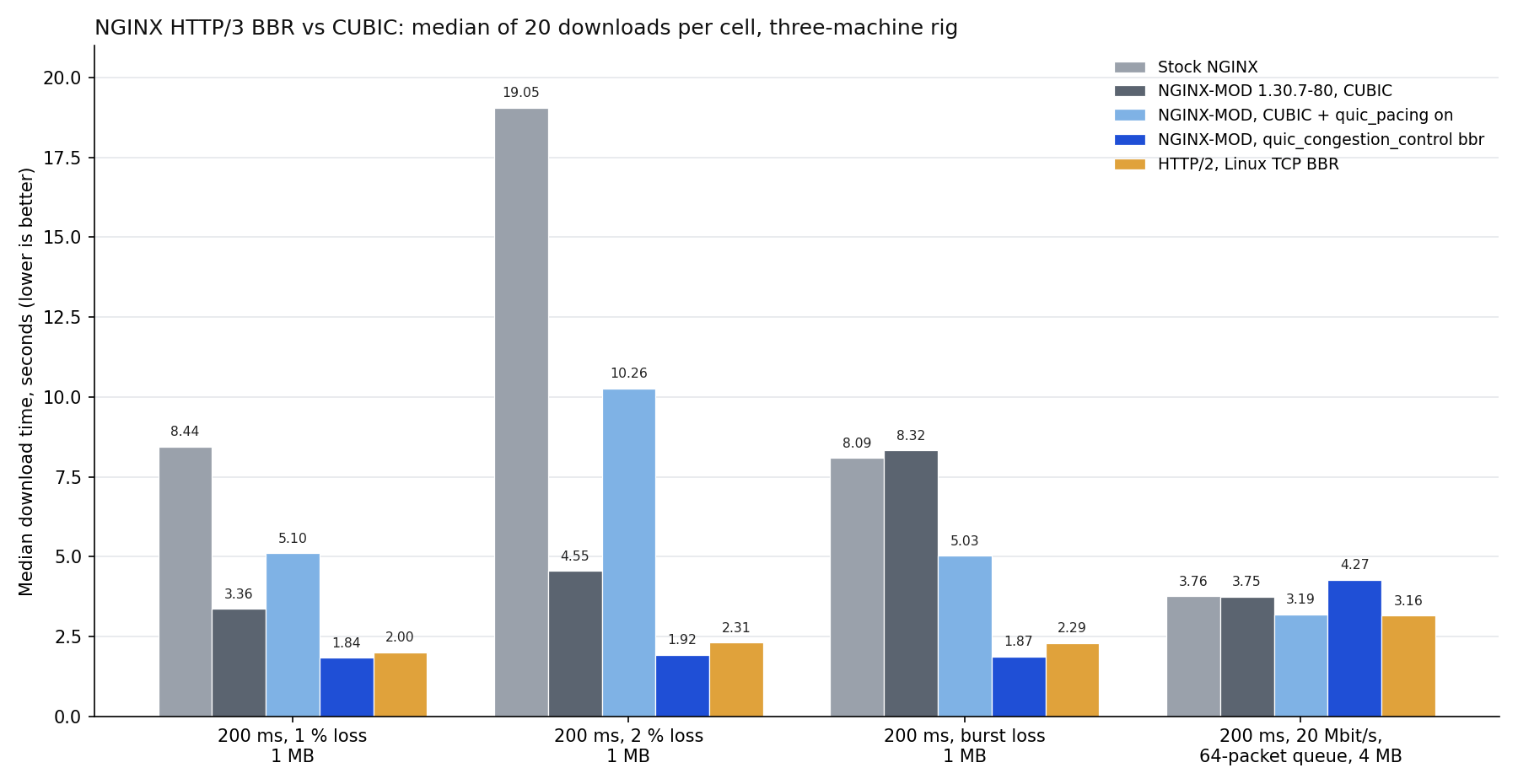
Median download time in seconds, 20 downloads per cell, 1 MB unless the row says otherwise. Lower is better.
| Network | Stock NGINX | NGINX-MOD 1.30.7-80 (CUBIC) | NGINX-MOD 1.30.7-80, CUBIC + quic_pacing on |
NGINX-MOD 1.30.7-80, quic_congestion_control bbr |
HTTP/2, TCP CUBIC | HTTP/2, TCP BBR |
|---|---|---|---|---|---|---|
| 200 ms, no loss | 1.63 | 1.63 | 1.66 | 1.44 | 1.83 | 1.81 |
| 200 ms, one handshake packet lost | 9.09 | 2.24 | 2.35 | 2.25 | n/a | n/a |
| 200 ms, 1 % loss | 8.44 | 3.36 | 5.10 | 1.84 | 4.36 | 2.00 |
| 200 ms, 2 % loss | 19.05 | 4.55 | 10.26 | 1.92 | 4.36 | 2.31 |
| 100 ms, 1 % loss | 6.29 | 1.58 | 1.96 | 0.89 | 2.15 | 1.05 |
| 200 ms, burst loss | 8.09 | 8.32 | 5.03 | 1.87 | 4.67 | 2.29 |
| 200 ms, 20 Mbit/s, 64-packet queue, 4 MB | 3.76 | 3.75 | 3.19 | 4.27 | 3.84 | 3.16 |
| 100 ms, 50 Mbit/s, 64-packet queue, 4 MB | 1.98 | 1.97 | 1.42 | 2.03 | 1.97 | 1.42 |
| 200 ms, 20 Mbit/s, 64-packet queue, 8 × 1 MB in parallel | 5.93 | 5.86 | 4.93 | 6.85 | 5.88 | 4.85 |
“Burst loss” means losses that come in clusters, the way they do on a fading radio link. Each packet has a 1 % chance to start a bad spell, every packet in a bad spell is lost, and a spell ends with a 30 % chance per packet. That averages about 3 % loss, in bursts of about three packets. The TCP columns cannot show the handshake row, because TCP has no equivalent of a lost QUIC handshake datagram.

Reading the Lossy Rows
BBR is the clear winner whenever packets are lost at random. At 200 ms and 2 % loss, it needs 1.92 seconds where stock NGINX needs 19. Against NGINX-MOD’s CUBIC, BBR is faster in every lossy row, and the difference is statistically solid (Mann-Whitney test, p < 0.002 in each row).
It also beats Linux TCP with BBR at 2 % loss, at 100 ms with 1 % loss, with burst loss and without loss. At 200 ms with 1 % loss the two are equal. In other words, HTTP/3 on NGINX-MOD with BBR is now at least as fast as the best HTTP/2 setup the kernel offers on these paths.
The median is only half of the story. The slowest tenth of the downloads matters just as much, because those are the visitors who give up. At 200 ms and 1 % loss, the 90th percentile was:
| Build | 90th percentile, 200 ms, 1 % loss |
|---|---|
| Stock NGINX | 19.64 s |
| NGINX-MOD 1.30.7-80, CUBIC | 11.18 s |
NGINX-MOD 1.30.7-80, quic_congestion_control bbr |
2.67 s |
| HTTP/2, TCP BBR | 2.31 s |
CUBIC under random loss is erratic, and you should be careful with its medians. We ran two CUBIC configurations that use identical congestion code, and their medians differed by up to 6 seconds in the 2 % and burst loss rows. BBR’s two identical copies, by contrast, never differed by more than 0.12 seconds in any lossy row.
Reading the Bottleneck Rows: Where BBR Loses
The last three rows tell a different story, and it is the reason NGINX-MOD has two directives instead of one.
Here the path has no random loss, but its bandwidth is limited to 20 or 50 Mbit/s and the router can queue only 64 packets. That is a realistic model of a home connection with a small router buffer. In this setup BBR is the slowest option: 4.27 seconds for 4 MB at 20 Mbit/s, against 3.19 for paced CUBIC. Against TCP BBR it is slower in all three rows, and that is no noise either (p < 1e-7).
The cause is how BBR starts. It probes for bandwidth by sending faster and faster. When the short queue overflows during that probe, version 3 of the algorithm leaves its startup phase at once and then approaches the real link rate slowly. With a large queue that never happens. With a 64-packet queue, it does.
CUBIC with quic_pacing on wins these rows. It matches HTTP/2 with TCP BBR within a tenth of a second: 3.19 against 3.16, 1.42 against 1.42 and 4.93 against 4.85. Pacing keeps CUBIC’s bursts from overflowing the queue, so it fills the link without self-inflicted loss.
However, pacing alone does not help CUBIC with random loss. In the lossy rows, paced CUBIC is no better than unpaced CUBIC, and sometimes worse.
Reading the No-Loss and Handshake Rows
On a clean 200 ms path BBR is the fastest option, at 1.44 seconds against 1.63 for CUBIC. Pacing costs CUBIC 0.03 seconds there.
The handshake row is the same in every NGINX-MOD configuration, 2.24 to 2.35 seconds against 9.09 for stock NGINX. The fix from our previous article stays in place for CUBIC, so this case does not depend on which controller you pick.
Which Setting Should You Use?
| Your visitors | Recommended setting | Our number |
|---|---|---|
| Spread across continents, many on mobile or Wi-Fi | quic_congestion_control bbr; |
1.84 s instead of 3.36 s at 200 ms and 1 % loss |
| Mostly nearby, on fixed lines, downloading large files | quic_pacing on; (CUBIC stays the default) |
3.19 s instead of 3.75 s behind a 20 Mbit/s link with a short queue |
| You cannot tell | quic_congestion_control bbr; |
Against CUBIC it loses up to 1.0 s in the short-queue rows, and saves 0.7 to 6.5 s in the lossy ones |
Most public websites serve a mixed, global audience, and that is where BBR has the most to win. We run quic_congestion_control bbr on our own production servers, including the one serving this page.
Why Production Teams Choose NGINX-MOD for HTTP/3
NGINX-MOD is the first NGINX build to bring BBR to NGINX’s own HTTP/3 stack. As of November 2026, that stack offers a single congestion controller, CUBIC, both in NGINX from nginx.org and in the forks built on it. If your visitors reach you over mobile networks or from other continents, that one choice decides how fast HTTP/3 feels to them.
What matters when you run it across a fleet:
- Measured, not assumed. Every number in this article comes from our own lab of three separate machines and from our own production server, with the downside reported next to the gain.
- Drop-in. It is the same NGINX configuration language and the same HTTP/3 implementation, in a signed RPM for RHEL, Rocky Linux, AlmaLinux, CentOS 7, Fedora and Amazon Linux. There is no second QUIC library to audit and no build chain to maintain.
- Opt-in and instantly reversible. Nothing changes until you set the directive. Going back is one line and a reload, and a reload keeps established HTTP/3 connections alive.
- One line for the whole fleet. The setting lives in the
httpblock, so your configuration management rolls it out like any other directive. - Fixes upstream does not ship. BBR joins the other HTTP/3 fixes in NGINX-MOD, such as the handshake-loss fix and the reload fix.
Running NGINX on many servers? The Fleet subscription covers 10 to 100 servers under one license. For a contractual SLA, purchase orders or redistribution to your own customers, talk to us about Enterprise.
Installation
The directives ship in NGINX-MOD 1.30.7-80 and later, for RHEL, CentOS, AlmaLinux, Rocky Linux, Fedora and Amazon Linux. Stock NGINX does not have them.
Requires a Pro subscription or higher.If you already run NGINX-MOD, update it. The package replaces the running binary gracefully, so no restart is needed:
sudo dnf -y update nginx-mod
If you run the standard nginx package, enable the NGINX-MOD repository and swap the packages. Your configuration stays as it is:
sudo dnf -y install https://extras.getpagespeed.com/release-latest.rpm
sudo dnf config-manager --enable getpagespeed-extras-nginx-mod
sudo dnf -y swap nginx nginx-mod
sudo systemctl enable --now nginx
On CentOS 7, use yum and yum-config-manager --enable in place of dnf and dnf config-manager --enable.
Then confirm the release. It must be 80 or later:
rpm -q nginx-mod
The Debian and Ubuntu build of NGINX-MOD does not have these directives yet.
Configuring NGINX HTTP/3 BBR and Pacing
quic_congestion_control
| Syntax | quic_congestion_control cubic \| bbr; |
| Default | quic_congestion_control cubic; |
| Context | http, server |
Selects the congestion controller for HTTP/3 connections. bbr is always paced, regardless of quic_pacing.
Set it in the http block, so that every QUIC listener uses it. On RHEL-based systems, every file in /etc/nginx/conf.d/ is already included inside http, so a small file is enough:
# /etc/nginx/conf.d/quic-congestion.conf
quic_congestion_control bbr;
Then test and reload:
sudo nginx -t && sudo systemctl reload nginx
Watch out for the default server. NGINX chooses the QUIC settings of a connection before it knows which site the visitor asked for. Therefore, it takes them from the default server of the address and port the packet arrived on. A quic_congestion_control line inside any other server block is accepted by nginx -t but silently ignored. We tested this: with bbr set only in a site that was not the default server for port 443, its connections still ran CUBIC. With the same line in http, they ran BBR.
quic_pacing
| Syntax | quic_pacing off \| on \| txtime; |
| Default | quic_pacing off; |
| Context | http, server |
Enables packet pacing for CUBIC. With on, NGINX-MOD spaces out packets itself. It has no effect with bbr, which always paces. The same default-server rule applies.
To keep CUBIC and add pacing:
# /etc/nginx/conf.d/quic-congestion.conf
quic_congestion_control cubic;
quic_pacing on;
The third value, txtime, hands the departure times to the Linux kernel instead. It needs the fq queueing discipline on the outgoing network interface and falls back to on when the kernel does not accept it. All measurements in this article use on.
A Complete Server Block
Here is a minimal HTTP/3 site with the settings that matter for distant visitors. It works with either of the files above:
server {
    listen 443 quic reuseport;
    listen 443 ssl;
    http2 on;
    http3 on;
    server_name example.com;

    ssl_certificate     /etc/pki/tls/certs/example.com.crt;
    ssl_certificate_key /etc/pki/tls/private/example.com.key;

    http3_stream_buffer_size 1m;

    add_header Alt-Svc 'h3=":443"; ma=86400' always;

    root /usr/share/nginx/html;
}
All of the measurements above used http3_stream_buffer_size 1m. With the default of 64k, one HTTP/3 stream cannot move more than 64 KB per round trip, and no congestion controller can make up for that on a long path. The previous article has the numbers. If you are setting up HTTP/3 from scratch, start with our guide on enabling NGINX HTTP/3.
Testing: Is NGINX HTTP/3 BBR Really Active?
nginx -t only proves that the syntax is valid. To see which controller a connection really uses, use the debug binary that the package ships as nginx-debug, and enable debug logging for one client address in the events block:
events {
    worker_connections 1024;
    debug_connection 203.0.113.10;
}
Switch to the debug binary, download a file over HTTP/3 from that address, and count the controller’s log lines:
sudo systemctl stop nginx
sudo systemctl start nginx-debug
# download a file over HTTP/3 from 203.0.113.10, then:
sudo grep -c 'quic bbr' /var/log/nginx/error.log
With BBR active, each connection logs hundreds of lines like this one:
quic bbr startup bw:1718547 max_bw:1718547 min_rtt:753 pacing:33234375 cwnd:13325 if:1075 round:1
With CUBIC, the count is zero and you see quic congestion ack lines instead. With quic_pacing on, lines starting with quic pacer appear as well.
Afterwards, remove the debug_connection line and switch back to the regular binary:
sudo systemctl stop nginx-debug
sudo systemctl start nginx
To measure the effect from the outside, you need a curl with HTTP/3 support. On RHEL-based systems, our curl-latest package provides one. Run it from a distant client, several times before and after the change:
for i in $(seq 1 20); do
    curl-latest -s -o /dev/null --http3-only \
        -w "%{http_code} %{time_total}\n" "https://example.com/1m.bin?run=$i"
done
Compare medians, not single runs. On a clean path the two controllers are close, so expect a visible difference only from clients whose network loses packets.
NGINX HTTP/3 BBR on Our Own Production Server
The lab sets the loss. A real network chooses its own, so we also switched www.getpagespeed.com, the server you are reading this on, and measured it from two places at once:
- a consumer connection in Southeast Asia, 254 ms away, whose route to our server lost 4 to 8 % of packets that day;
- a cloud server in Singapore, 167 ms away, with no loss at all.
To rule out the network simply getting better, we did not stop at one before and one after. We switched CUBIC, BBR, CUBIC and BBR again, a few minutes apart, with a reload between each step. Each cell is the median of five 1 MB downloads:
| Step | Controller | Lossy consumer path, HTTP/3 | Same path, HTTP/2 | Clean cloud path, HTTP/3 |
|---|---|---|---|---|
| 1 | CUBIC | 46.81 s | 4.49 s | 1.35 s |
| 2 | bbr |
2.88 s | 5.91 s | 1.21 s |
| 3 | CUBIC | 49.59 s | 3.92 s | 1.34 s |
| 4 | bbr |
4.03 s | 3.31 s | 1.19 s |
On the lossy path, HTTP/3 with CUBIC took close to a minute for 1 MB, ten times longer than HTTP/2 on the same connection. With BBR it took 3 to 4 seconds, as fast as HTTP/2 or faster. The effect followed the setting both times it was flipped, so it is not the network. Even on the clean path BBR saved a tenth of a second.
Performance Considerations
On a clean path, switching to BBR costs nothing: it finished a 1 MB download at 200 ms 0.19 seconds faster than CUBIC. Pacing CUBIC cost 0.03 seconds on the same path.
Our measurements cover one client implementation and emulated loss on cloud machines, and all rows but one download a single file per connection. Real visitors use browsers that open many streams on one connection. Accordingly, treat the table as a guide to the direction and size of the effect, and confirm it with your own before-and-after numbers.
Security Best Practices
Neither directive adds a listener or changes what a client can request. The congestion window and the QUIC anti-amplification limit still bound how much the server sends to an address that has not proven it is real.
Keep the debug log scoped. A global error_log ... debug on a busy server writes gigabytes and records request details. debug_connection with a single address avoids both.
Troubleshooting
nginx: [emerg] unknown directive "quic_congestion_control". The running package is not NGINX-MOD 1.30.7-80 or later. Check rpm -q nginx-mod.
nginx: [emerg] "quic_pacing" directive is not allowed here. The directive is inside a location block. Move it to http or server.
nginx: [emerg] invalid value "reno". Only cubic and bbr are accepted by quic_congestion_control, and only off, on and txtime by quic_pacing.
BBR is configured, but the debug log shows no quic bbr lines. The setting is probably in a server block that is not the default server for that port. Move it to http.
HTTP/3 is slow on every connection, not just from lossy networks. Check http3_stream_buffer_size first, then whether UDP is rate-limited somewhere on the path.
HTTP/3 breaks after nginx -s reload. That is the QUIC reload bug, which our packages also fix.
Conclusion
Choosing the right congestion controller once is the easy part. Keeping every host on it as configs evolve and NGINX versions roll forward is where regressions creep back in. GetPageSpeed Amplify runs scheduled gixy scans across every host and ties findings to live NGINX runtime metrics. Drop-in compatible with the deprecated nginx-amplify-agent (EOL January 2026).
CUBIC reads every lost packet as congestion, so HTTP/3 on stock NGINX slows to a crawl on exactly the networks where visitors already struggle. With NGINX HTTP/3 BBR enabled through quic_congestion_control bbr, NGINX-MOD downloads a 1 MB file at 200 ms and 2 % loss in 1.92 seconds instead of 19. Behind a small home-router queue, quic_pacing on with CUBIC is the better choice, and it matches the kernel’s best TCP setup.
Both directives ship in NGINX-MOD 1.30.7-80, and you will not find them in stock NGINX. Subscribe to the GetPageSpeed repository to get them, along with every other fix we ship ahead of upstream.