
dnf, yum or apt upgrades. It maintains the largest RPM repository of NGINX module packages and Varnish VMODs, with APT packages for Debian and Ubuntu.
Free to install; commercial production use requires a subscription. Without one, a small license notice appears on HTML pages after 30 days.
In these “amazing” times, we have more time to do stuff beyond work. Some fun stuff.
Linux-based operating systems can be leveraged not just for work, but also for fun and entertainment.
In this post, I’ll run through a few quick steps to connecting a PS3 gamepad controller to your CentOS/RHEL Linux system.
And guess what, you’ll be amazed how easy it is.
The Linux kernel is that amazing that you don’t need any extra software to connect your PS3 controller via USB
(and you can actually use it in some Steam games like my favorite Trine 3 title).
But what about going wireless and connecting it via Bluetooth? Easy too!
Requirements
- A CentOS/RHEL system with Gnome GUI installed
- Bluetooth adapter / working Bluetooth connectivity
- The PS3 gamepad controller (duh)
Pairing the PS3 game controller with your Linux system
Step 1. Connect the controller via USB
Connect your PS3 controller to your system via USB. Next, run extra steps depending on your system.
CentOS/RHEL 6 or 7
The CentOS/RHEL 6 or 7 operating systems have older kernels, and you will need to use the sixpair utility for the controller to be paired with the system:
sudo dnf -y install https://extras.getpagespeed.com/release-latest.rpm
sudo dnf install sixpair
Now, run:
sudo sixpair
You’ll see the following output:
Current Bluetooth master: ac:bc:32:c5:80:48
Setting master bd_addr to ac:bc:32:c5:80:48
CentOS/RHEL 8
No special steps are needed on RHEL 8 because it ships with the newer kernel.
Step 2. Authorize the Bluetooth connection
Unplug the controller and wait for the Bluetooth connectivity prompt:
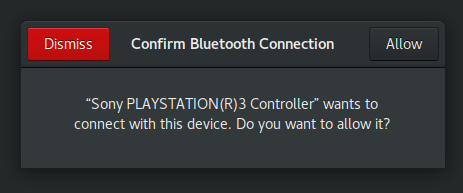
Click “Allow” and that’s it. When the connection is established, the red LEDs on the controller are no longer blinking. Told you that would be easy?
If you want to pair it back to PS3 instead of the computer, just turn on the Playstation, and connect the controller via USB, then unplug.