yum upgrades for production use, this is the repository for you.
Active subscription is required.
You followed the classic ngx_pagespeed build guide. You downloaded the PSOL tarball, ran ./configure --add-dynamic-module=../incubator-pagespeed-ngx, and the build died. Either the compiler stopped on ngx_pagespeed.cc, or the module compiled and then NGINX refused to load it with an undefined symbol. Both outcomes are expected today, and neither is your fault.
This article explains the three separate reasons the original ngx_pagespeed no longer builds on a current NGINX and a current Linux, and then shows the way out: a packaged, version-matched nginx-module-pagespeed that installs with one dnf command on Rocky Linux 9, AlmaLinux 9 and RHEL 9, on both x86_64 and aarch64. Every command below was executed on a clean Rocky Linux 9 system before publishing.
Why ngx_pagespeed stopped building
The Apache ngx_pagespeed module was retired on 2023-03-17. The repository is archived. Its last commits patched NGINX 1.23.0 compatibility in the tree, but no release was ever tagged with them. Three things broke independently since then.
1. NGINX 1.23 changed the response header API
NGINX 1.23.0 rewrote how multiple same-name response headers are stored. Fields such as r->headers_out.cache_control stopped being an ngx_array_t and became a linked list of ngx_table_elt_t. The original ngx_pagespeed reads and writes that array directly, so compilation fails on every NGINX from 1.23.0 onwards, including every current stable and mainline release:
src/ngx_pagespeed.cc:410:36: error: request for member 'elts' in 'r->headers_out.cache_control',
  which is of pointer type 'ngx_table_elt_t*' (maybe you meant to use '->' ?)
src/ngx_pagespeed.cc:411:35: error: cannot convert 'ngx_table_elt_t**' to 'ngx_array_t*'
make[1]: *** [objs/addon/src/ngx_pagespeed.o] Error 1
This is the error behind the upstream report incubator-pagespeed-ngx is not compatible with nginx 1.23.0. A patch exists in the archived tree, but it never reached a tagged release, so every “download the latest release” guide points at code that cannot compile.
2. The PSOL binary predates your glibc
Even if you patch the module source, ngx_pagespeed links against PSOL, the PageSpeed Optimization Library. PSOL was shipped as a prebuilt x86_64 binary. The last official release, 1.13.35.2, dates from 2018, and it was compiled against a glibc of that era. It references symbols that newer glibc versions have since removed from the link namespace or renamed: sys_siglist (gone in glibc 2.32), pthread_yield, the pthread_mutex_consistent_np and pthread_mutexattr_setrobust_np names, and a private gettid that collides with the public one glibc 2.30 added.
On Enterprise Linux 9 (glibc 2.34) and anything newer, the module either fails to link, or links and then fails at nginx -t with an undefined symbol error from dlopen. Building PSOL yourself is not a way out either. The upstream build moved to Bazel in 2020, and nobody has published a working recipe for a current toolchain since.
3. PSOL is x86_64 only
PSOL bundles Chromium’s base/ library and image codecs compiled with SSE intrinsics. There was never an aarch64 build. If your servers are Graviton, Ampere or any other ARM64 platform, the original module cannot run there at all, patched or not.
The fix: install the package, skip the build
GetPageSpeed has packaged nginx-module-pagespeed for Enterprise Linux since 2016. The package is rebuilt for every NGINX release in the repository, so the module and the NGINX binary always match. There are two lines available:
Stable nginx-module-pagespeed |
v2 beta nginx-module-pagespeed |
|
|---|---|---|
| Codebase | Original module, 1.14.36.x, maintained PSOL rebuild with the glibc fixes applied | Complete from-scratch re-implementation (2.1.0 beta) |
| Architectures | x86_64 | x86_64 and aarch64 |
| Distributions | EL8 and newer | EL9 |
| AVIF | No | Yes |
| Channel | Default getpagespeed-extras |
Opt-in getpagespeed-extras-testing |
The v2 line is the interesting one. ngx_pagespeed v2 is a complete from-scratch re-implementation of the original Apache ngx_pagespeed module. It is proprietary, supported, and a superset of the original, with AVIF, aarch64, and a maintained roadmap the Apache project never delivered. There is no PSOL blob in it. The rewriter is built from a modern C++20 code base with current abseil, protobuf and image codecs, which is exactly why it compiles against NGINX 1.30 and glibc 2.34 without patches. The configuration surface is kept compatible, so an existing pagespeed config carries over.
Package downloads require an active NGINX Extras subscription.
Install nginx-module-pagespeed on Rocky Linux 9, AlmaLinux 9 and RHEL 9
Step 1. Add the GetPageSpeed repository
sudo dnf install -y https://extras.getpagespeed.com/release-latest.rpm
This installs the repository definitions, including the opt-in getpagespeed-extras-testing channel, which stays disabled until you enable it.
Step 2. Install NGINX and the v2 PageSpeed module
Install both packages in one transaction so dnf picks the NGINX build the module was compiled against:
sudo dnf install -y --enablerepo=getpagespeed-extras-testing nginx nginx-module-pagespeed
On aarch64 the output ends with the module’s post-install hint:
Installing       : nginx-3:1.30.6-73.el9.gps.aarch64
Installing       : nginx-module-pagespeed-selinux-1:1.30.6+2.1.0~beta13-1.el9.gps
Installing       : nginx-module-pagespeed-1:1.30.6+2.1.0~beta13-1.el9.gps.aarch64
    load_module modules/ngx_pagespeed.so;
Complete!
The SELinux policy package is pulled in automatically, so the module works with SELinux in enforcing mode.
If you want future dnf upgrade runs to keep tracking the v2 line instead of dropping back to the stable package, enable the channel permanently:
sudo dnf config-manager --set-enabled getpagespeed-extras-testing
If you prefer the stable 1.14.36.x line on x86_64, leave the testing channel alone and run sudo dnf install -y nginx nginx-module-pagespeed.
Step 3. Load the module
Add the load_module line at the very top of /etc/nginx/nginx.conf, above the events and http blocks:
load_module modules/ngx_pagespeed.so;
Step 4. Enable PageSpeed
Create /etc/nginx/conf.d/pagespeed.conf with the global settings. The package already creates /var/cache/pagespeed with the right ownership:
pagespeed on;
pagespeed FileCachePath /var/cache/pagespeed;
pagespeed RewriteLevel CoreFilters;
pagespeed EnableFilters convert_jpeg_to_avif,convert_png_to_avif;
CoreFilters is the safe default set. The EnableFilters line adds the AVIF converters on top, which are specific to the v2 line. Then add the three handler locations to every server block you want optimized:
server {
    listen 80;
    server_name localhost;
    root /usr/share/nginx/html;

    location ~ "\.pagespeed\.([a-z]\.)?[a-z]{2}\.[^.]{10}\.[^.]+" {
        add_header "" "";
    }
    location ~ "^/pagespeed_static/" { }
    location = /ngx_pagespeed_beacon { }
}
Check and reload:
sudo nginx -t
sudo systemctl reload nginx
The full directive and filter reference lives at nginx-extras.getpagespeed.com/modules/pagespeed/.
Prove it works
Put a small page with a stylesheet, a script and a JPEG under the document root, then request it a few times. The X-PSA-Blocking-Rewrite header forces the rewriter to finish before responding, which is handy for a test but not something you send in production:
for i in 1 2 3 4 5; do
  curl -s -H 'Accept: image/avif,image/webp,*/*' \
       -H 'X-PSA-Blocking-Rewrite: psatest' \
       -o /dev/null http://localhost/demo/index.html
done
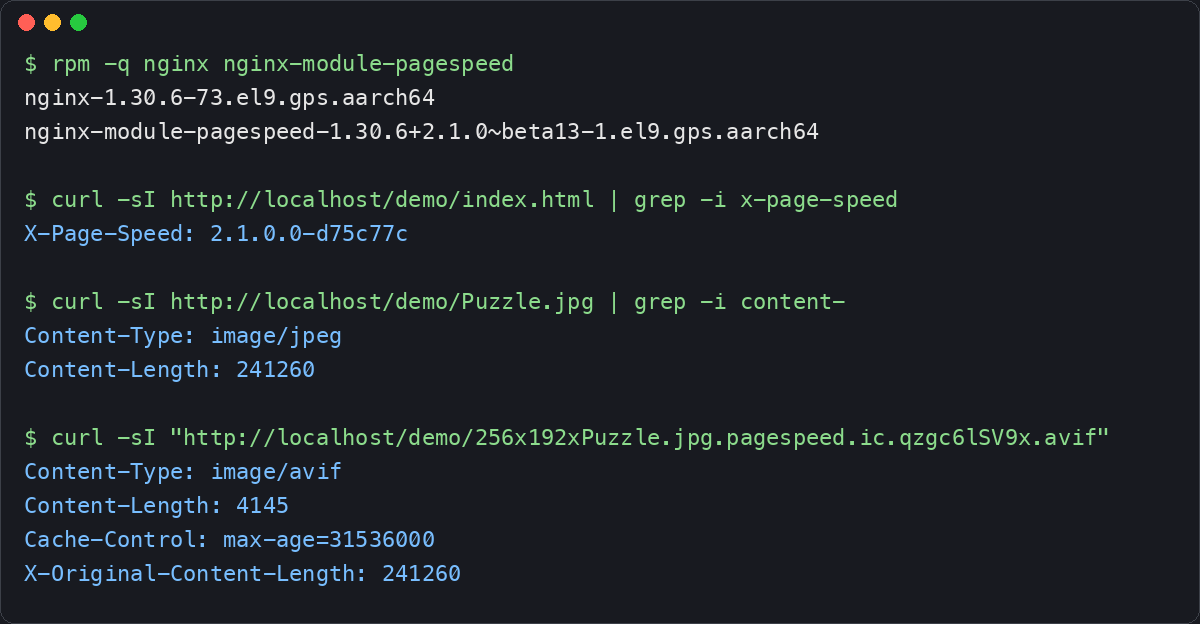
curl -sI http://localhost/demo/index.html | grep -i x-page-speed
The response header identifies the module build:
X-Page-Speed: 2.1.0.0-d75c77c
The HTML itself comes back rewritten. The external stylesheet and script were small, so CoreFilters minified and inlined both, and the 241 KB JPEG was resized to its displayed dimensions and converted to AVIF:
<style>body{color:#333;margin:0}</style>
<script>function hello(name){return"hello "+name;}</script>
...
<img src="/demo/256x192xPuzzle.jpg.pagespeed.ic.qzgc6lSV9x.avif" width="256" height="192">
Fetching the rewritten image URL shows the size difference and the long cache lifetime PageSpeed attaches to content-hashed URLs:
curl -sI "http://localhost/demo/256x192xPuzzle.jpg.pagespeed.ic.qzgc6lSV9x.avif"
Content-Type: image/avif
Content-Length: 4145
Cache-Control: max-age=31536000
X-Original-Content-Length: 241260
That is 241,260 bytes down to 4,145 bytes for one image, with no build step and no PSOL download.
What is in v2.1.0-beta13
The current testing-channel package is 2.1.0~beta13. On top of the AVIF converters and aarch64 support, this build adds:
- AVIF recompression. Images that are already AVIF are recompressed to the configured quality instead of being passed through untouched.
- Hardening from the security and correctness audit. HTML token and fetched body size limits, a guard in the image sprite filter, safe handling of resources protected by Subresource Integrity, bounds checking on image quality options, and stripping
s-maxagetogether withmax-agewhen PageSpeed disables caching on optimized HTML, so a shared cache cannot keep a stale copy. - WebP fallback for Safari 16+ and Firefox 132+. These browsers omit image formats from the
Acceptheader on HTML navigations. Beta13 recognizes them by version and serves lossy WebP rewritten URLs anyway, instead of falling back to the original format.
The package is a beta and does not replace the stable package unless you deliberately enable the testing channel. Validate it on a staging host first, then roll it out.
Troubleshooting
requires nginx-r1.30.5, but none of the providers can be installed. The module is version-locked to the NGINX build it was compiled against. This appears when a newer NGINX is already installed, or was published hours before the matching module rebuild landed. Install nginx and nginx-module-pagespeed in the same dnf transaction, as shown above, and dnf picks the matching pair. The mechanics are covered in NGINX Module Version Mismatch: When APT Lets It Through.
unknown directive "pagespeed". The load_module line is missing or sits inside the http block. It must be at the top level of nginx.conf.
Pages are not rewritten. PageSpeed only rewrites text/html responses, and the first requests for a page populate the cache. Load the page several times, then look for .pagespeed. URLs in the HTML source or check the X-Page-Speed response header.
NGINX was installed from nginx.org or the distribution. The module needs the GetPageSpeed NGINX build of the same version. Remove the other nginx package first, then install both packages from the GetPageSpeed repository.
Debian and Ubuntu
The stable module is also packaged for APT. First, set up the GetPageSpeed APT repository, then install:
sudo apt-get update
sudo apt-get install nginx-module-pagespeed
On Debian/Ubuntu, the package handles module loading automatically. No load_module directive is needed. The v2 beta is published in the opt-in Ubuntu 24.04 testing suite. See the APT module page for the channel switch.
Conclusion
A working PageSpeed setup only stays working until the next NGINX release. Version-locked modules, cache paths and rewrite rules drift out of sync as hosts are upgraded one at a time. GetPageSpeed Amplify runs scheduled gixy scans across every host and ties findings to live NGINX runtime metrics. Drop-in compatible with the deprecated nginx-amplify-agent (EOL January 2026).
The original ngx_pagespeed cannot be built on a current NGINX because the project retired without ever releasing a fix for the NGINX 1.23 header API change, and its PSOL binary predates the glibc on every supported Enterprise Linux. Patching around it is a dead end on x86_64 and impossible on aarch64.
The packaged module removes the problem instead of working around it. One dnf install gives you a version-matched nginx-module-pagespeed, rebuilt for every NGINX release, with the v2 line adding AVIF conversion and aarch64 support. If you run PageSpeed on ARM64 servers, the NGINX PageSpeed ARM64 guide for Magento on Rocky Linux 9 walks through a full production tuning.