yum upgrades for production use, this is the repository for you.
Active subscription is required.
📅 Updated: October 3, 2026 (Originally published: August 24, 2026)
NGINX ESI lets you keep one proxy, one cache, and one TLS stack while assembling a cached page from independently cached fragments. That removes the usual reason for placing Varnish between NGINX and Magento 2. It also removes a process, a configuration language, and a second cache lifecycle from the request path.
We built nginx-module-esi for that job, then tested the claim against Varnish Cache OSS instead of assuming that a simpler stack must be faster. On a cloned Magento Open Source 2.4.8-p5 store, NGINX rendered the same eight ESI blocks, honored Magento’s real cache-tag purge events, and cut median cold-fragment assembly time by 59%.
The module is available in GetPageSpeed Pro for supported NGINX stable and mainline packages on RPM and Debian-family systems. The canonical nginx-module-esi documentation covers installation, every directive, Magento configuration, gzip safety, limitations, and rollback.
How NGINX ESI works
An origin can cache the stable shell of a page for hours while marking volatile blocks with an include:
<h1>Product name</h1>
<esi:include src="/fragments/stock/42" />
NGINX serves the cached shell, fetches the fragment as an internal subrequest, and replaces the tag before sending the response. The shell and fragments can use different proxy_cache zones and different TTLs. Includes at the same nesting level run concurrently.
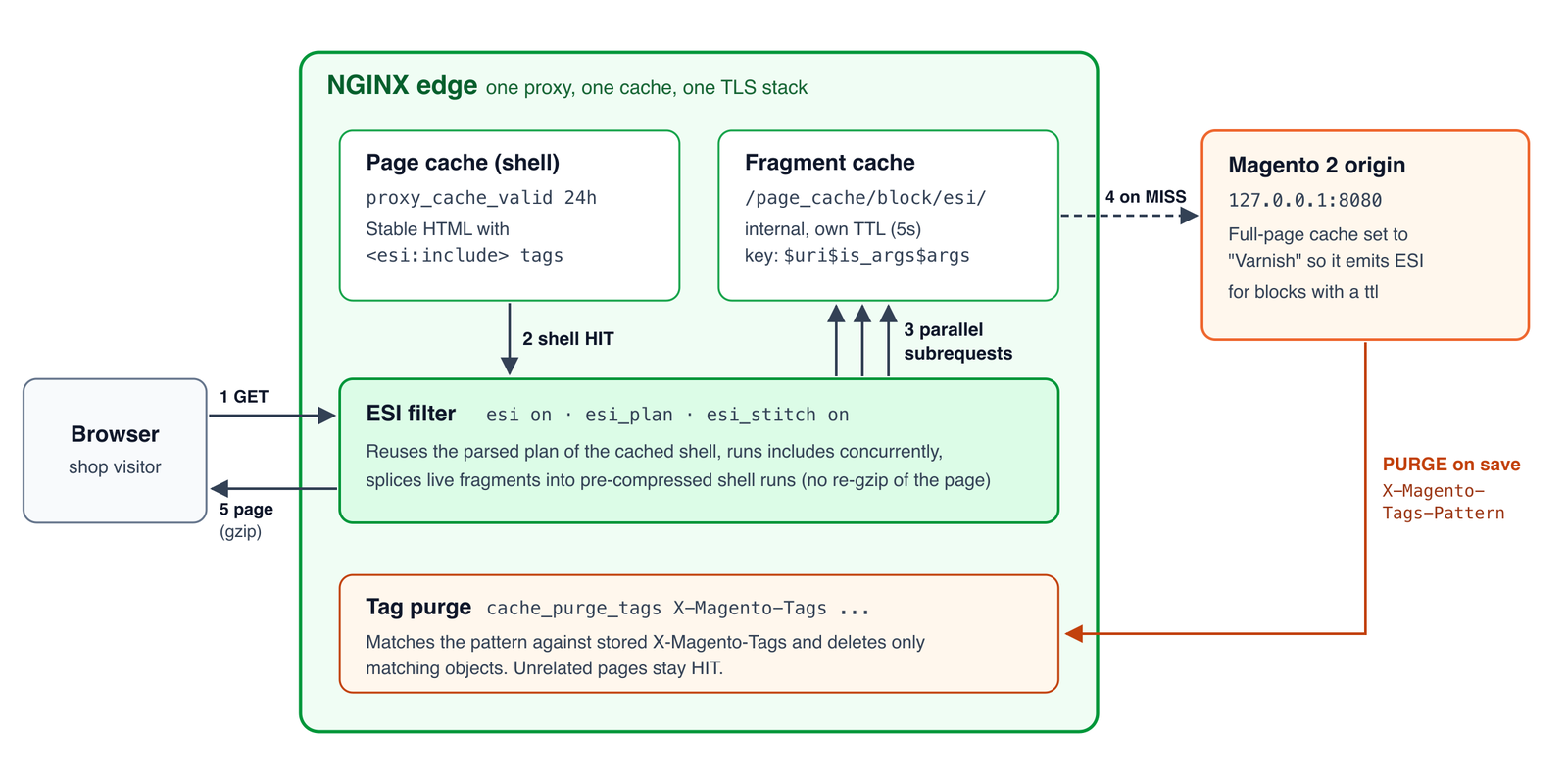
For higher-throughput NGINX ESI deployments, esi_plan memoizes the parsed structure of a cached object. esi_stitch goes further: it stores compressed runs of the stable shell and compresses only the live fragments on delivery. That avoids inflating and recompressing a large cached page on every hit.
The NGINX ESI subset covers the patterns used by Magento and most fragment-caching applications:
<esi:include>withsrc,alt, andonerror="continue"<esi:remove>- ESI tags wrapped in HTML comments
<esi:comment>removal<esi:vars>tag stripping while preserving its content- nested includes with recursion protection
Unknown ESI tags pass through with a warning. esi:choose, esi:when, esi:otherwise, and ESI variable substitution are not implemented. Neither Varnish Cache OSS nor this module implements the whole ESI 1.0 language, so test an application that uses more than includes before migrating.
What Magento’s default VCL actually does
Adobe Commerce’s generated Varnish 7 configuration enables ESI for text responses, enables gzip for text, and handles a PURGE carrying X-Magento-Tags-Pattern by banning cached objects whose X-Magento-Tags metadata matches the pattern. You can see those three behaviors in Magento’s current varnish7.vcl.
Magento itself emits <esi:include> only when full-page cache is enabled, the page is cacheable, a block has a ttl, and the cache application is set to Varnish. Keep that Magento setting when NGINX replaces Varnish:
sudo -u www-data php bin/magento config:set \
    system/full_page_cache/caching_application 2
sudo -u www-data php bin/magento cache:flush config full_page
There is an important detail about Surrogate-Capability. Magento 2.4.8-p5 does not condition ESI generation on this request header. Its ProcessLayoutRenderElement observer checks the full-page-cache type. We still advertise the capability because it is the correct negotiation signal for other surrogate-aware middleware:
proxy_set_header Surrogate-Capability \
    'nginx="Surrogate/1.0 ESI/1.0 tags/1"';
Magento also generates absolute HTTP include URLs even when the storefront is HTTPS. The NGINX ESI 1.0.1 package recognizes same-authority absolute and scheme-relative URLs, safely reduces them to local subrequests, and rejects remote authorities and unsafe encoded traversal.
Install the ESI and cache-purge modules
RHEL, Rocky Linux, AlmaLinux, and compatible systems
sudo dnf install https://extras.getpagespeed.com/release-latest.rpm
sudo dnf install nginx-module-esi nginx-module-cache-purge
Load both dynamic modules near the top of /etc/nginx/nginx.conf, before events:
load_module modules/ngx_http_esi_filter_module.so;
load_module modules/ngx_http_cache_purge_module.so;
Debian and Ubuntu
First enable the repository using the NGINX Extras APT setup, then install the packages:
sudo apt-get update
sudo apt-get install nginx-module-esi nginx-module-cache-purge
The Debian packages load their dynamic modules automatically. The RPM module index and APT module index track the available builds.
Configure NGINX ESI for Magento 2
The following is the NGINX ESI cache configuration we ran against Magento 2.4.8-p5. The Magento origin listens on 127.0.0.1:8080; the edge NGINX owns port 80 or 443. Keep your normal PHP and static-file locations on the origin. At the edge, serve /static/ and /media/ directly from the shared Magento filesystem rather than proxying them through PHP.
Put the cache zones and maps in the http context:
proxy_cache_path /var/cache/nginx/magento levels=1:2
    keys_zone=magento_cache:64m max_size=4g inactive=1d
    use_temp_path=off;

esi_plan_zone magento_esi_plans:64m;

map $request_method $magento_skip_method {
    default 1;
    GET     0;
    HEAD    0;
    PURGE   0;
}

map $uri $magento_skip_path {
    default                                0;
    ~^/(?:customer|checkout)(?:/|$)        1;
    ~^/(?:pub/)?health_check\.php$         1;
    ~^/graphql(?:/|$)                      1;
}

map $args $magento_skip_query {
    default 1;
    ""      0;
}

map $http_authorization $magento_skip_auth {
    default 1;
    ""      0;
}

map "$magento_skip_method:$magento_skip_path:$magento_skip_query:$magento_skip_auth"
    $magento_bypass {
    default 0;
    ~1      1;
}

map $http_cookie $magento_vary {
    default "";
    "~*(?:^|;\s*)X-Magento-Vary=([^;]*)" $1;
}
Then add these locations to the edge server. The named location keeps personalized and otherwise unsafe requests out of the full-page cache.
location ^~ /page_cache/block/esi/ {
    internal;
    proxy_pass http://127.0.0.1:8080;
    proxy_set_header Host $host;
    proxy_set_header X-Forwarded-Proto $scheme;
    proxy_set_header Accept-Encoding "";
    proxy_set_header Surrogate-Capability
        'nginx="Surrogate/1.0 ESI/1.0 tags/1"';

    proxy_cache magento_cache;
    proxy_cache_key "fragment:$scheme:$host:$uri$is_args$args:$magento_vary";
    proxy_cache_valid 200 5s;
    proxy_cache_lock on;
    proxy_ignore_headers Set-Cookie;
    proxy_hide_header Set-Cookie;

    esi on;
}

location / {
    if ($magento_bypass) { return 418; }
    error_page 418 = @magento_pass;

    proxy_pass http://127.0.0.1:8080;
    proxy_set_header Host $host;
    proxy_set_header X-Forwarded-Proto $scheme;
    proxy_set_header Accept-Encoding "";
    proxy_set_header Surrogate-Capability
        'nginx="Surrogate/1.0 ESI/1.0 tags/1"';

    proxy_cache magento_cache;
    proxy_cache_key "page:$scheme:$host:$request_uri:$magento_vary";
    proxy_cache_valid 200 24h;
    proxy_cache_lock on;
    proxy_cache_use_stale error timeout updating
        http_500 http_502 http_503 http_504;
    proxy_ignore_headers Set-Cookie;
    proxy_hide_header Set-Cookie;
    proxy_hide_header X-Magento-Tags;

    proxy_cache_purge PURGE from 127.0.0.1;
    cache_purge_tags X-Magento-Tags X-Magento-Tags-Pattern;

    esi on;
    esi_plan magento_esi_plans;
    esi_stitch on;

    add_header X-Magento-Cache-Debug
        "NGINX-$upstream_cache_status" always;
}

location @magento_pass {
    proxy_pass http://127.0.0.1:8080;
    proxy_set_header Host $host;
    proxy_set_header X-Forwarded-Proto $scheme;
    proxy_set_header Accept-Encoding "";
    proxy_set_header Surrogate-Capability
        'nginx="Surrogate/1.0 ESI/1.0 tags/1"';
    add_header X-Magento-Cache-Debug "NGINX-BYPASS" always;
}
The fragment cache key deliberately uses $uri$is_args$args. Inside an NGINX subrequest, $request_uri still belongs to the main request. Using it would collapse different ESI fragments onto one cache key.
proxy_ignore_headers Set-Cookie is appropriate only for Magento ttl blocks that you have designed as public fragments. Do not put customer names, carts, account data, or other private output in a cacheable ESI block. Magento’s customer sections are normally rendered client-side for this reason.
Validate and reload:
sudo nginx -t
sudo systemctl reload nginx
Directive reference
| Directive | Context | Default | Purpose |
|---|---|---|---|
esi on or esi off |
http, server, location, location if |
off |
Enable response-body ESI processing. |
esi_silent_errors on or off |
http, server, location |
off |
Suppress fragment error bodies instead of failing loudly. Prefer explicit onerror="continue" where possible. |
esi_buffer_size size |
http, server, location |
one OS page | Parser input buffer size. It is not a whole-response buffer. |
esi_types type ... |
http, server, location |
HTML types | MIME types eligible for ESI processing. |
esi_plan_zone name:size |
http |
none | Shared memory for cached parse plans. Minimum size is eight OS pages. |
esi_plan zone or esi_plan off |
http, server, location |
off |
Reuse the parsed structure of cache hits. |
esi_stitch on or esi_stitch off |
http, server, location |
off |
Store compressed stable runs and stitch live compressed fragments. Requires esi_plan. |
esi_stitch_level 1..9 |
http, server, location |
6 |
Compression level for stitched runs. |
proxy_cache_purge PURGE from address ... |
http, server, location |
none | Permit cache purges only from listed clients. |
cache_purge_tags cached-header pattern-header |
http, server, location |
none | Match a purge regex against cached response metadata and delete only matching objects. |
Test rendering and cache hits
First verify that Magento produces ESI markup at the origin while the NGINX ESI edge returns rendered fragments:
curl -sS -H 'Host: shop.example.com' \
    http://127.0.0.1:8080/product.html | grep -o '<esi:include[^>]*>'

curl -sS -H 'Host: shop.example.com' \
    http://127.0.0.1/product.html | grep '<esi:include'
The first command should show tags. The second should print nothing. Prime the page twice and inspect the debug header:
curl -sSI -H 'Host: shop.example.com' http://127.0.0.1/product.html \
    | grep -i x-magento-cache-debug
curl -sSI -H 'Host: shop.example.com' http://127.0.0.1/product.html \
    | grep -i x-magento-cache-debug
Expect NGINX-MISS, then NGINX-HIT.
For gzip, use curl’s decoder and verify that the body still contains rendered fragment output:
curl --compressed -sS -D /tmp/headers \
    -H 'Host: shop.example.com' -H 'Accept-Encoding: gzip' \
    http://127.0.0.1/product.html -o /tmp/product.html
grep -i '^content-encoding: gzip' /tmp/headers
grep '<esi:include' /tmp/product.html
The last command must have no output.
Prove Magento cache-tag purge parity
Page rendering is only half of a Varnish replacement. Magento must also invalidate a changed product without flushing unrelated pages.
The cache_purge_tags directive gives ngx_cache_purge the missing tag index behavior. On a PURGE, it scans cache metadata, matches X-Magento-Tags-Pattern against the stored X-Magento-Tags, and removes matching files. It does no scan on ordinary traffic.
We verified this with Magento’s real invalidation path, not a hand-written curl pretending to be Magento. Magento loaded product ID 36, resolved tags cat_p_36 and cat_p, and dispatched its clean_cache_by_tags event through the normal page-cache observer and purge transport.
| Cache arm | Product before | Control page before | Product after event | Control after event | Product next request |
|---|---|---|---|---|---|
| Varnish 8.0.2 | HIT | HIT | MISS | HIT | HIT |
| NGINX 1.30.4 | NGINX-HIT | NGINX-HIT | NGINX-MISS | NGINX-HIT | NGINX-HIT |
The control was Magento’s cookie-policy CMS page, which carried unrelated CMS tags. A full bin/magento cache:clean full_page also produced MISS then HIT on both arms. A PURGE sent from outside the host was denied by both proxies: Varnish returned 405 and NGINX returned 403.
This gives the NGINX ESI cache selective invalidation, not the conservative full-cache flush older NGINX Magento recipes settle for. Untagged fragment objects also survive Magento’s .* full-page tag purge, matching the behavior intended by Magento’s generated VCL.
Performance against Varnish
We tested NGINX ESI against Varnish Cache OSS 7.6.5 on a dedicated eight-vCPU Linode. Each proxy was pinned to one core. Caches were warm, output was byte-identical before timing, and an A/A control showed 0.27% median drift.
With a 256 KB cached shell, gzip, and one fragment, NGINX delivered 8,877 requests per second against Varnish’s 3,915. CPU time was 112 ms per 1,000 requests against 256 ms. Across the 24-row matrix, NGINX used two to six times less CPU per request and Varnish won no row.
The larger latency difference appears when a page has several uncached or expired fragments:
| Workload | NGINX result relative to Varnish OSS |
|---|---|
| Multiple delayed fragments, gzip | 332% to 2,956% more throughput |
| Multiple delayed fragments, no gzip | 105% to 729% more throughput |
| 32 fragments, 50 ms origin delay | p99 107 ms vs 1,680 ms |
The reason is concurrency. Varnish Cache OSS resolves ESI includes sequentially. Varnish Enterprise provides parallel ESI, so do not project these multi-fragment results onto the Enterprise product. And if you would rather keep Varnish than replace it, we now package parallel ESI for Varnish 6.0 LTS as vmod-pesi in the same repository, which closes much of this multi-fragment gap on the Varnish side.
There is also no magic win when there is no parallel work. One-fragment rows with 20 ms and 50 ms origin delay were a dead heat, just 2.5% and 1.1% apart against a roughly 0.1% floor.
Shell size matters too. Before stitching, NGINX beat Varnish by 18% at 16 KB, lost by 62% at 64 KB, and lost by 90% at 256 KB. esi_stitch closes that large-shell gap. It costs a second representation in esi_plan_zone and about 12% at compression-level segment boundaries. In the measured case Varnish paid the same boundary cost and both produced an identical 1,030-byte response.
The Magento store result
We then provisioned two identical Ubuntu 24.04 Linodes with Magento Open Source 2.4.8-p5, cloned the same database and application, loaded 2,040 sample products, and added eight five-second ESI probe blocks. One edge ran Varnish 8.0.2 with Magento’s generated VCL. The other ran NGINX ESI 1.0.1 and cache-purge 2.6.0 packages built for NGINX 1.30.4.
Across 12 rounds with the page shell cached and all eight fragments cold, Varnish’s median assembly time was 1.001 seconds. NGINX’s median was 0.411 seconds, 2.43 times faster and 59% lower. Both returned eight rendered fragments and no raw ESI markup.
What the benchmark found in our own code
The useful part of comparing two ESI implementations was not only the speed. Treating Varnish as an output oracle caught a silent gzip corruption bug: a gzipped fragment could be inserted as raw deflate into an already-decoded page. The result was a 200 response with a compressed hole. Version 1.0.1 contains the fix and a dedicated regression test.
The rerun also disproved our first explanation for the slower large-shell rows. The real limit was output_buffers, which capped fragment concurrency when stitching was disabled. Moving from output_buffers 2 32k to 4 512k more than doubled throughput and halved p99 in that workload. With esi_stitch on, performance no longer depended on that tuning.
Security considerations
- Keep the Magento ESI endpoint
internal. Browsers should not invoke it directly through the edge. - Restrict
PURGEto loopback or a tightly controlled management network. Never usefrom allon a public server. - Keep authenticated, cart, checkout, GraphQL, and query-string requests out of the anonymous page cache unless you have designed explicit cache keys for them.
- Include
X-Magento-Varyin page and fragment keys so store and design variants cannot collide. - The module accepts only local or same-authority absolute include URLs. Cross-authority and unsafe traversal targets fail closed.
- Send an uncompressed origin response with
proxy_set_header Accept-Encoding "", as shown. If the origin must send gzip, enable NGINXgunzipbefore ESI processing.
Troubleshooting
Magento returns no ESI tags
Confirm full-page cache is enabled, caching_application is 2, the page is cacheable, and the block has a ttl. The Surrogate-Capability header alone does not switch Magento into ESI mode.
The browser receives raw <esi:include> markup
Confirm esi on applies to the final response location and that its content type is in esi_types. Run nginx -T to inspect the assembled configuration rather than only the file you edited.
Every fragment contains the same block
Do not use $request_uri in the fragment cache key. Use $uri$is_args$args, because $request_uri continues to describe the parent request during an ESI subrequest.
NGINX reports an upstream header is too big
Magento pages can carry a large X-Magento-Tags response header. Increase proxy_buffer_size and proxy_buffers, for example proxy_buffer_size 16k; proxy_buffers 8 16k;, then retest with a tag-heavy category page.
Gzip output is corrupt or ESI refuses to process it
Make the upstream response uncompressed or use gunzip on. The module deliberately refuses to splice live bytes into a raw gzip stream when it cannot prove that the representation is safe.
Many slow fragments do not overlap
Enable esi_plan and esi_stitch. Without stitching, larger output_buffers can be necessary to keep more fragment subrequests in flight. Measure before changing buffer sizes because larger per-request buffers consume more memory under concurrency.
Keep NGINX, drop the extra cache tier
NGINX ESI now covers the practical Magento path: same-authority absolute includes, concurrent fragment assembly, gzip-safe stitching, independently cached fragments, and selective X-Magento-Tags invalidation. The migration reduces the stack without giving up Magento’s real purge semantics.
The limits are explicit. It implements the include-focused ESI subset, stores a second compressed representation when stitching is enabled, and the strongest multi-fragment comparison is against sequential ESI in Varnish Cache OSS. Within that boundary, both the synthetic matrix and the cloned Magento store support the same conclusion: NGINX can own the complete edge path.
Get GetPageSpeed Pro to install nginx-module-esi and nginx-module-cache-purge from the maintained NGINX package repositories. Keep the nginx-module-esi reference beside your production configuration.
Replacing Varnish should also make the NGINX layer easier to operate. Fragment caching is only useful when configuration regressions stay visible. GetPageSpeed Amplify runs scheduled gixy scans across every host and ties findings to live NGINX runtime metrics. Drop-in compatible with the deprecated nginx-amplify-agent (EOL January 2026).